Design Watchlist with a Unique First Time UX
Product
Finance Technology
Product
Finance Technology
Company
Tuntun Sekuritas
Company
Tuntun Sekuritas
Role
Sr. Product Designer
Role
Sr. Product Designer
Project Background
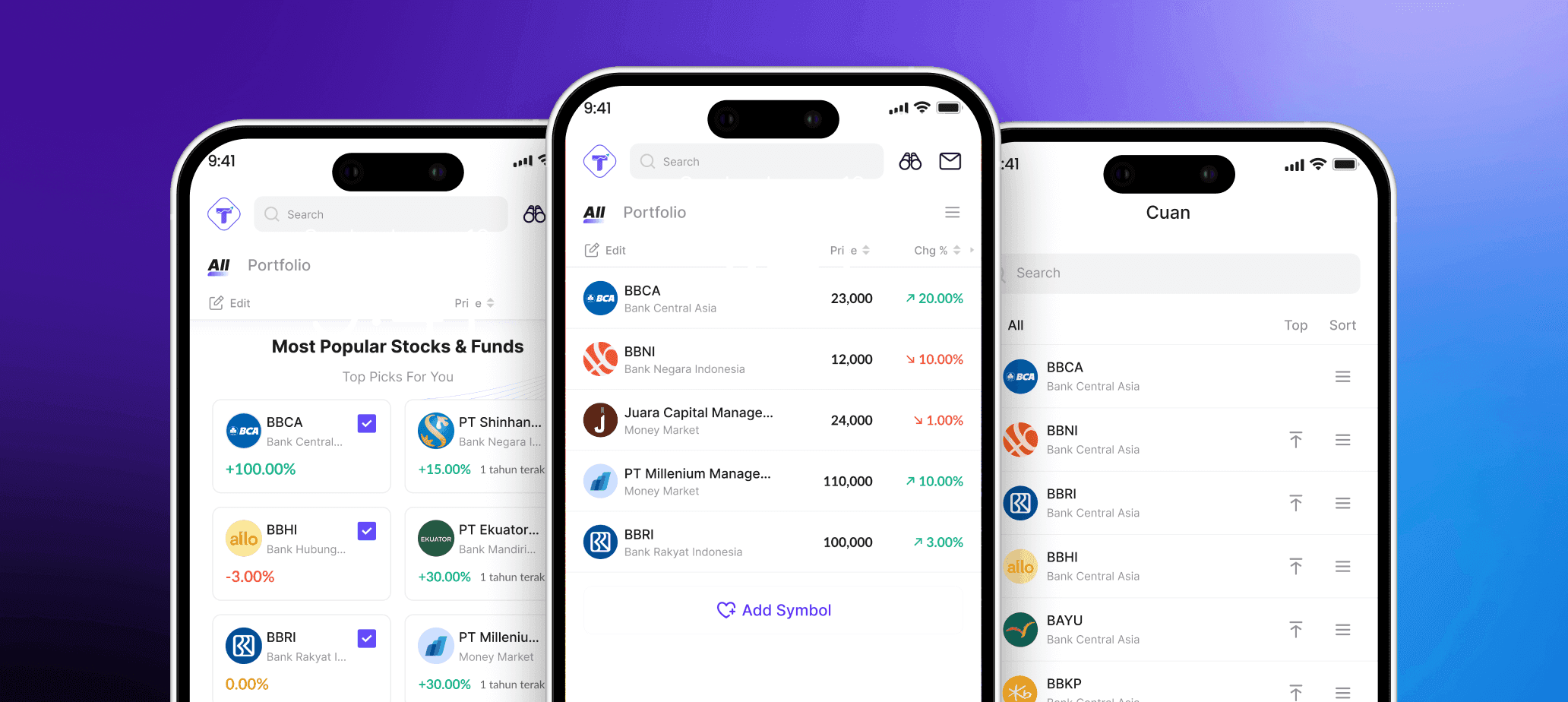
Watchlist features help investors monitor market movements. We believe users who use multiple watchlists are more engaged, spend more time tracking asset performance, and may contribute to higher revenue. Therefore, we want to introduce this feature in Tuntun.
Project Background
Watchlist features help investors monitor market movements. We believe users who use multiple watchlists are more engaged, spend more time tracking asset performance, and may contribute to higher revenue. Therefore, we want to introduce this feature in Tuntun.
Project Objective
We want to design a watchlist for stocks and mutual funds where users can create watchlist groups to monitor their investments. Users can delete groups, sort items, and easily manage their watchlists. Our goal is to encourage more frequent use of this feature.
Project Objective
We want to design a watchlist for stocks and mutual funds where users can create watchlist groups to monitor their investments. Users can delete groups, sort items, and easily manage their watchlists. Our goal is to encourage more frequent use of this feature.
Business Impact After Released
60%
Approximately 60% of new active users interacted with Watchlist
60%
Approximately 60% of new active users interacted with Watchlist
60%
Approximately 60% of new active users interacted with Watchlist
20%
Watchlist driven transactions increased by ~20% in first month
20%
Watchlist driven transactions increased by ~20% in first month
20%
Watchlist driven transactions increased by ~20% in first month
Retention
Still oberving and it have a strong repeat usage in the first month
Retention
Still oberving and it have a strong repeat usage in the first month
Retention
Still oberving and it have a strong repeat usage in the first month
Why this feature exist?
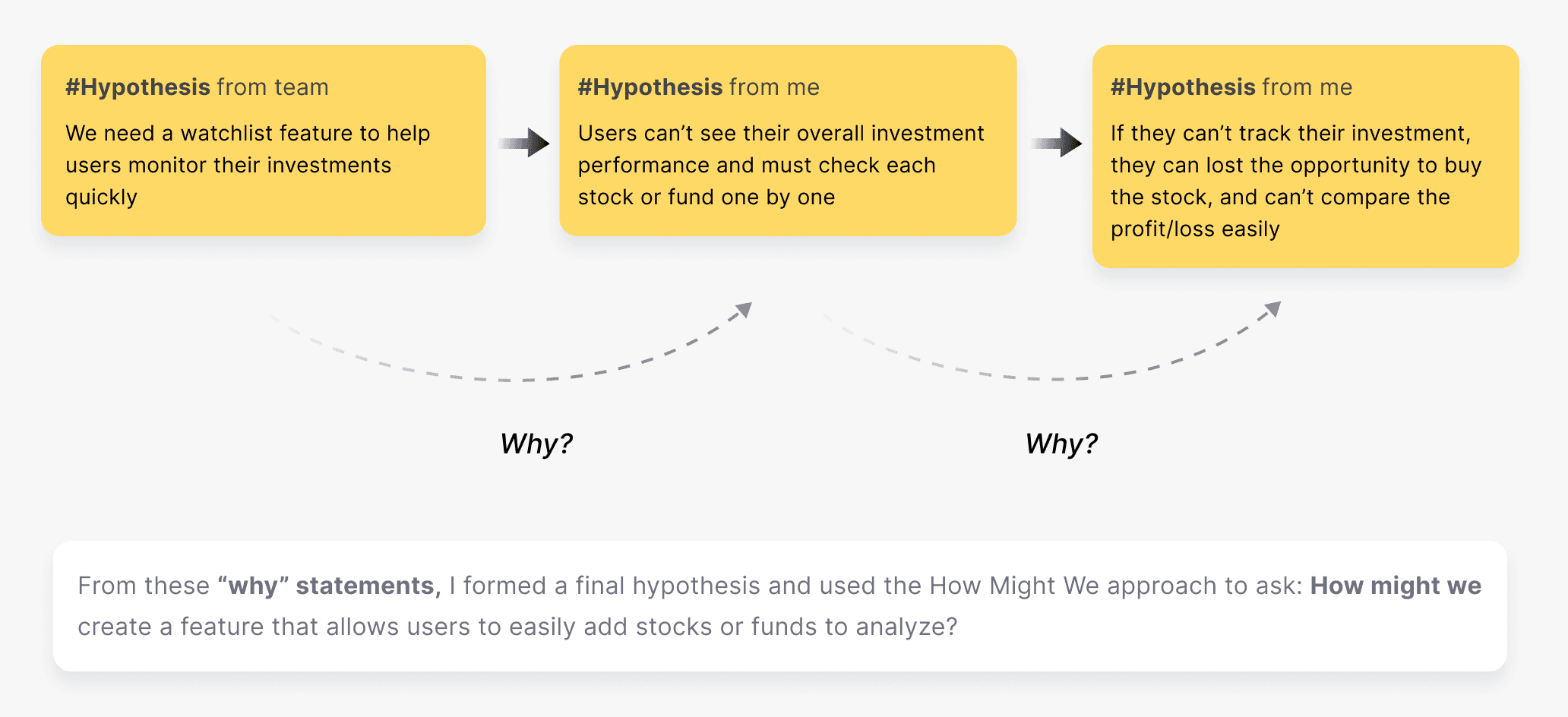
I want to understand the core problem at the start of the process by forming hypotheses about the problem we need to solve. I then connect these hypotheses with the How Might We framework to explore potential solutions for the concept design later.
Why this feature exist?
I want to understand the core problem at the start of the process by forming hypotheses about the problem we need to solve. I then connect these hypotheses with the How Might We framework to explore potential solutions for the concept design later.
Why this feature exist?
I want to understand the core problem at the start of the process by forming hypotheses about the problem we need to solve. I then connect these hypotheses with the How Might We framework to explore potential solutions for the concept design later.
Gather Requirement from Stakeholders
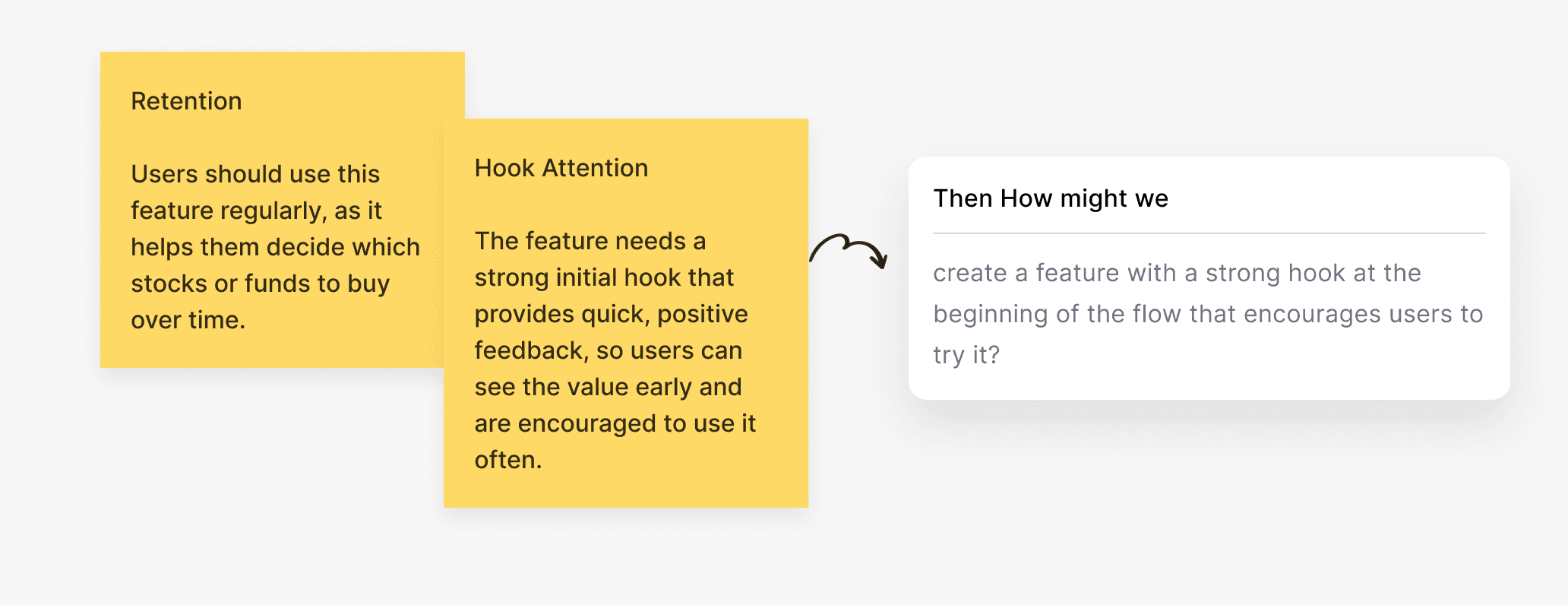
I also gathered requirements from stakeholders. They want strong user retention as part of the success metrics and a compelling hook at the beginning of the flow to capture users’ attention. This aligns well with improving user retention and could become a strong idea for the feature.
Gather Requirement from Stakeholders
I also gathered requirements from stakeholders. They want strong user retention as part of the success metrics and a compelling hook at the beginning of the flow to capture users’ attention. This aligns well with improving user retention and could become a strong idea for the feature.
Gather Requirement from Stakeholders
I also gathered requirements from stakeholders. They want strong user retention as part of the success metrics and a compelling hook at the beginning of the flow to capture users’ attention. This aligns well with improving user retention and could become a strong idea for the feature.
Who are the Users?

Advanced Users
2+ years of experience, use Finance App more often to invest & trade
Advanced Users
2+ years of experience, use Finance App more often to invest & trade

Beginner Users
0-2 years of experience who are not familiar with finance industry/apps.
Beginner Users
0-2 years of experience who are not familiar with finance industry/apps.
Understanding the customer needs
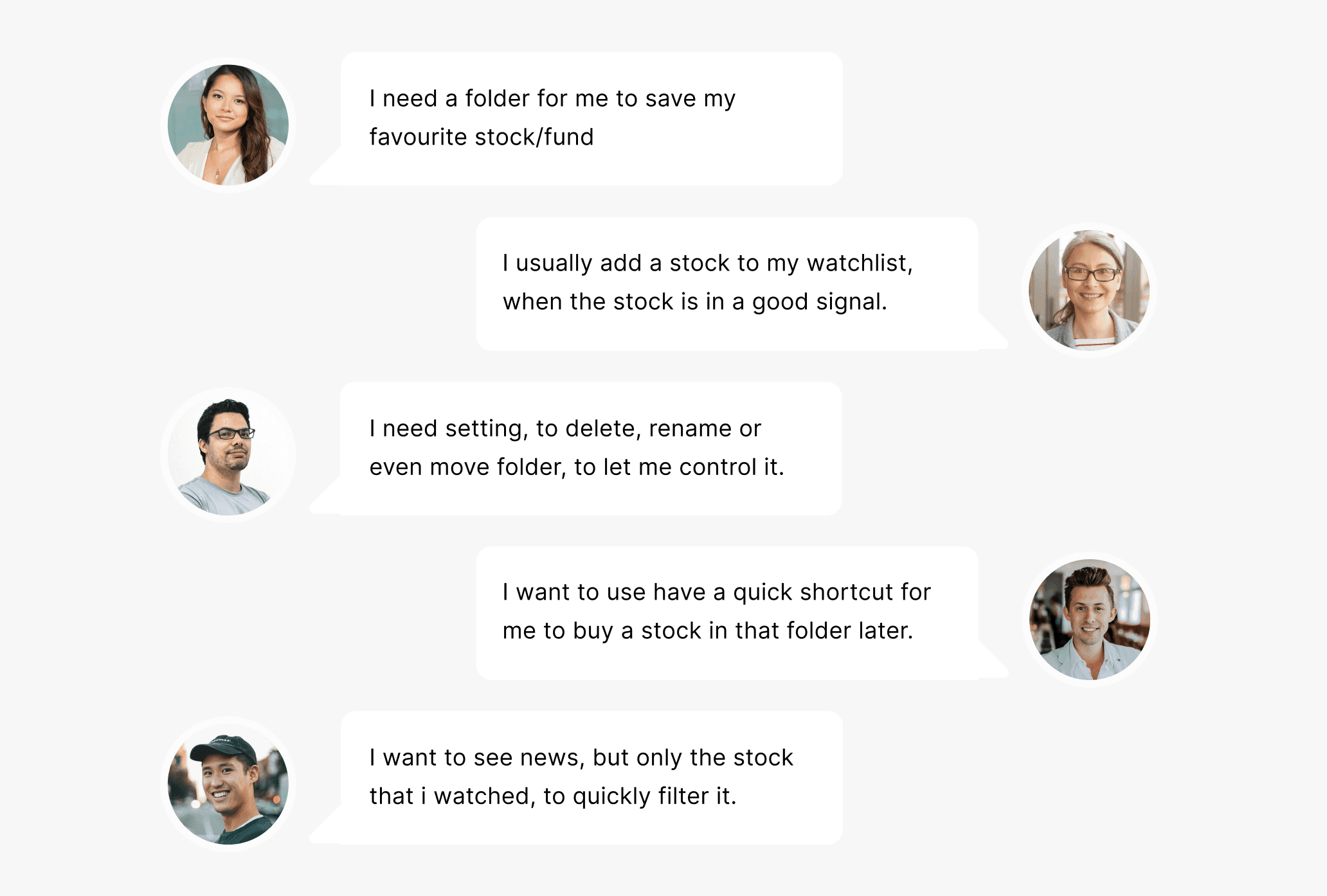
After understanding the users who will use this feature, I conducted interviews with five people to discuss their needs and motivations for using a watchlist feature. I also identified problems they experienced when using watchlists in other apps, which helped me understand the issues to solve.
Understanding the customer needs
After understanding the users who will use this feature, I conducted interviews with five people to discuss their needs and motivations for using a watchlist feature. I also identified problems they experienced when using watchlists in other apps, which helped me understand the issues to solve.
Understanding the customer needs
After understanding the users who will use this feature, I conducted interviews with five people to discuss their needs and motivations for using a watchlist feature. I also identified problems they experienced when using watchlists in other apps, which helped me understand the issues to solve.
🚀 Then, the goal already clear
We need to create a feature that allows users to save their investments into groups so they can analyze them independently. We also need an engaging hook at the beginning, so users can understand the feature through learning by doing.
Visual Principle
I use this visual principle for my consideration in the concept design, and all of design decision for this feature.

Design with a hook
Users need to quickly understand the feature and feel interested in trying the product.
Design with a hook
Users need to quickly understand the feature and feel interested in trying the product.

Ease of Use (Usability)
Users should be able to use the feature easily without needing to think or remember too much.
Ease of Use (Usability)
Users should be able to use the feature easily without needing to think or remember too much.

Good Clarity
The feature should have a clean layout and clear data hierarchy for all information.
Good Clarity
The feature should have a clean layout and clear data hierarchy for all information.
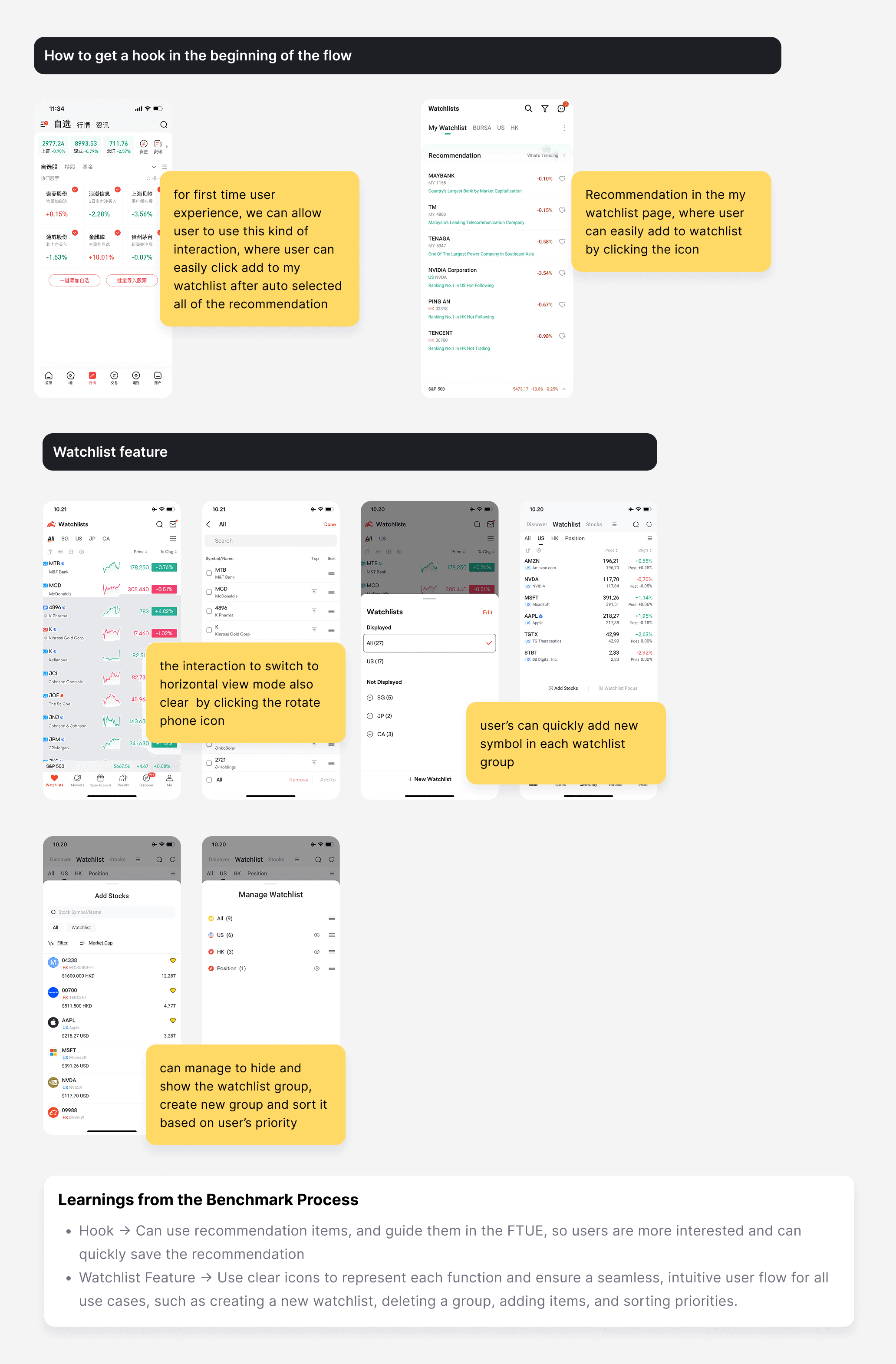
Benchmark Process
Benchmark Process
Benchmark Process
Hook Concepts Exploration
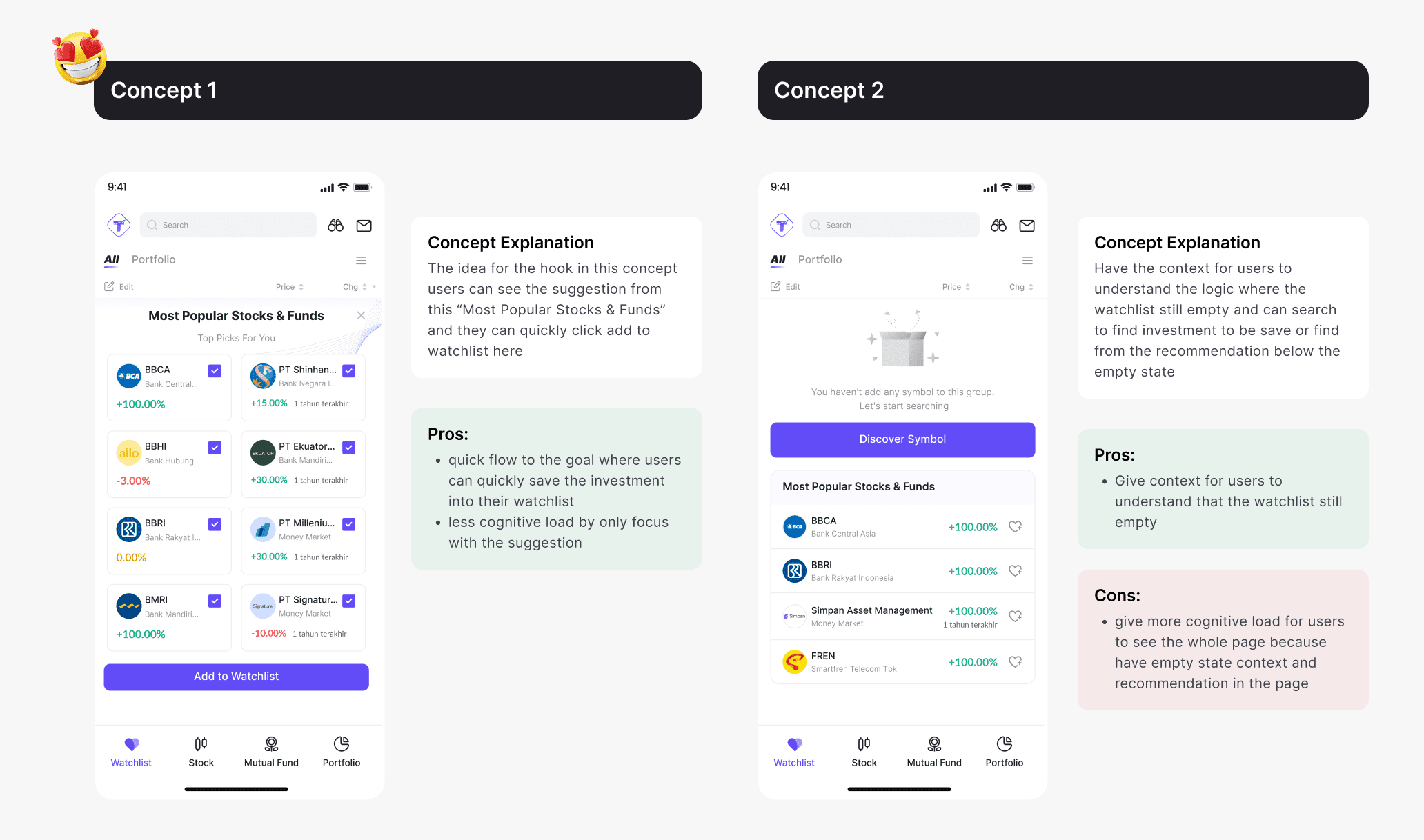
The concept of the hook is to help users understand the flow and make them interested in trying the feature. From the two concepts I tested with users, they preferred Concept 1 because it was easier to interact with and allowed them to access the watchlist feature more quickly. Therefore, I used this concept as the hook at the beginning of the flow.
Hook Concepts Exploration
The concept of the hook is to help users understand the flow and make them interested in trying the feature. From the two concepts I tested with users, they preferred Concept 1 because it was easier to interact with and allowed them to access the watchlist feature more quickly. Therefore, I used this concept as the hook at the beginning of the flow.
Hook Concepts Exploration
The concept of the hook is to help users understand the flow and make them interested in trying the feature. From the two concepts I tested with users, they preferred Concept 1 because it was easier to interact with and allowed them to access the watchlist feature more quickly. Therefore, I used this concept as the hook at the beginning of the flow.
Jobs to be Done & Feature that i need to design
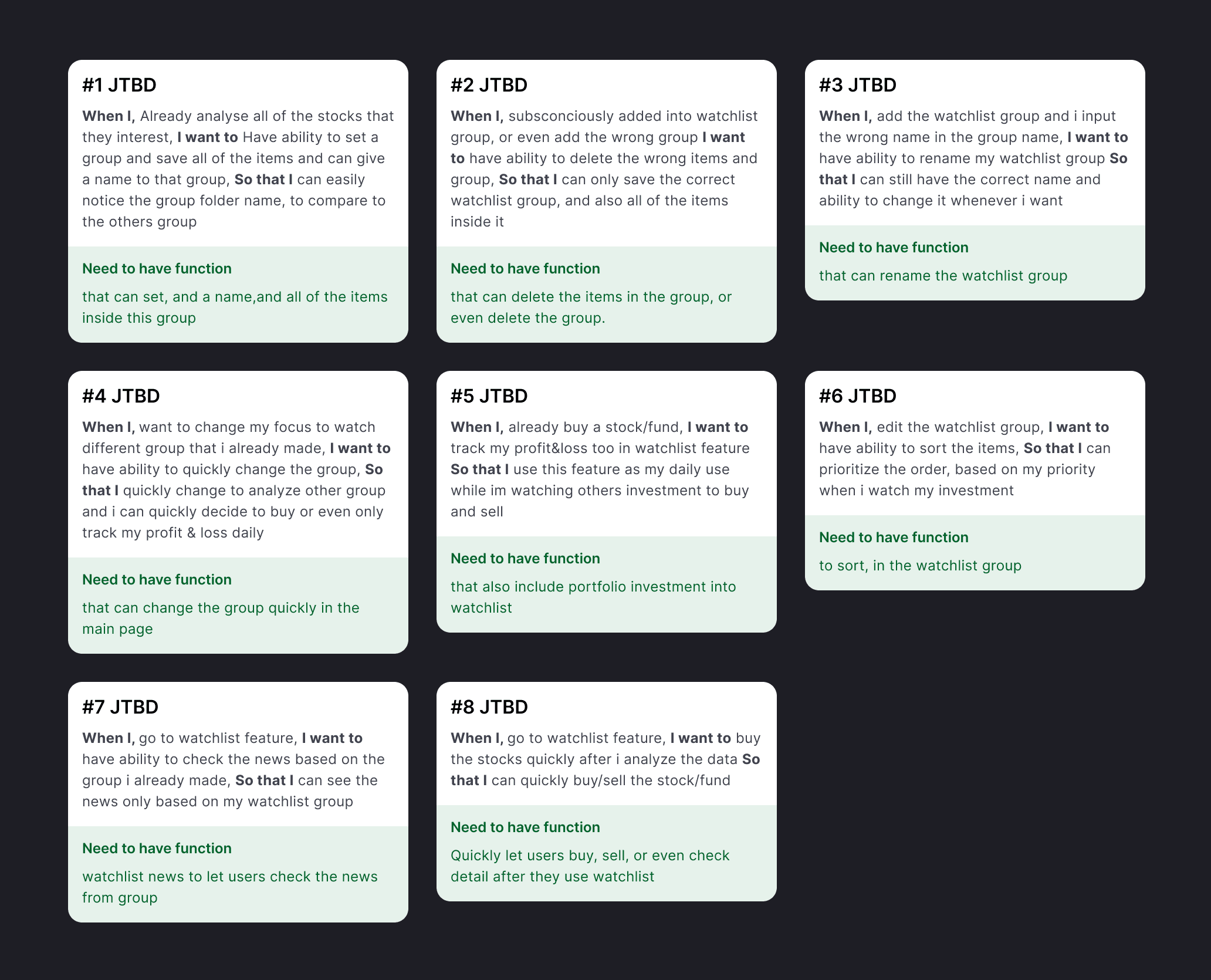
After we agreed on the hook concept, I mapped out the JTBD for the watchlist feature and defined the features that needed to be designed. All of these JTBDs were based on insights from my user research.
Jobs to be Done & Feature that i need to design
After we agreed on the hook concept, I mapped out the JTBD for the watchlist feature and defined the features that needed to be designed. All of these JTBDs were based on insights from my user research.
Jobs to be Done & Feature that i need to design
After we agreed on the hook concept, I mapped out the JTBD for the watchlist feature and defined the features that needed to be designed. All of these JTBDs were based on insights from my user research.
User Flow and all of the journey
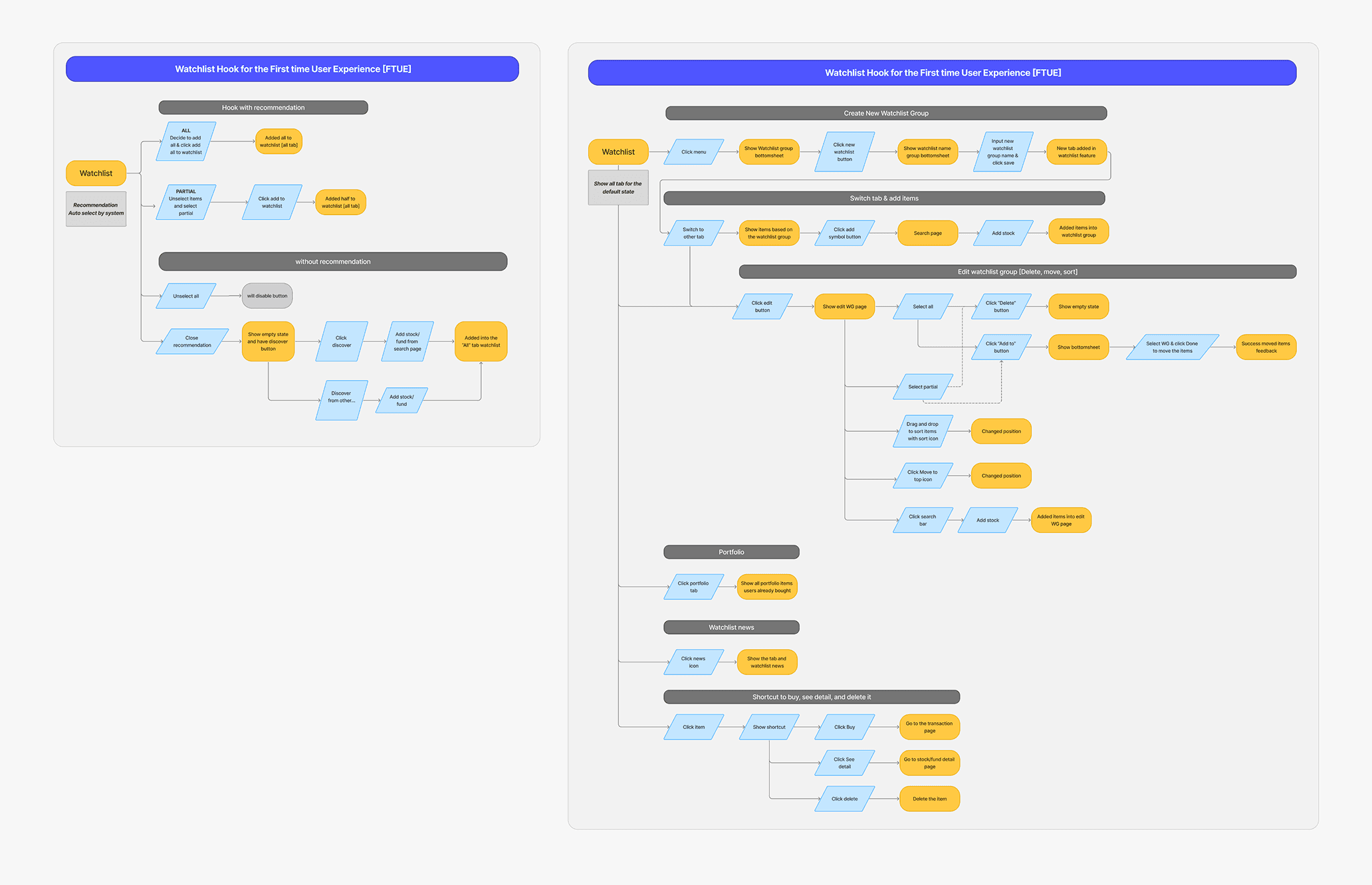
Below are the user flows for the hook concept and the watchlist feature. Before moving into design, I discussed them with stakeholders and the team. After receiving approval, I designed the feature based on the agreed requirements.
User Flow and all of the journey
Below are the user flows for the hook concept and the watchlist feature. Before moving into design, I discussed them with stakeholders and the team. After receiving approval, I designed the feature based on the agreed requirements.
User Flow and all of the journey
Below are the user flows for the hook concept and the watchlist feature. Before moving into design, I discussed them with stakeholders and the team. After receiving approval, I designed the feature based on the agreed requirements.
Popular Recommendation in First Time User experience
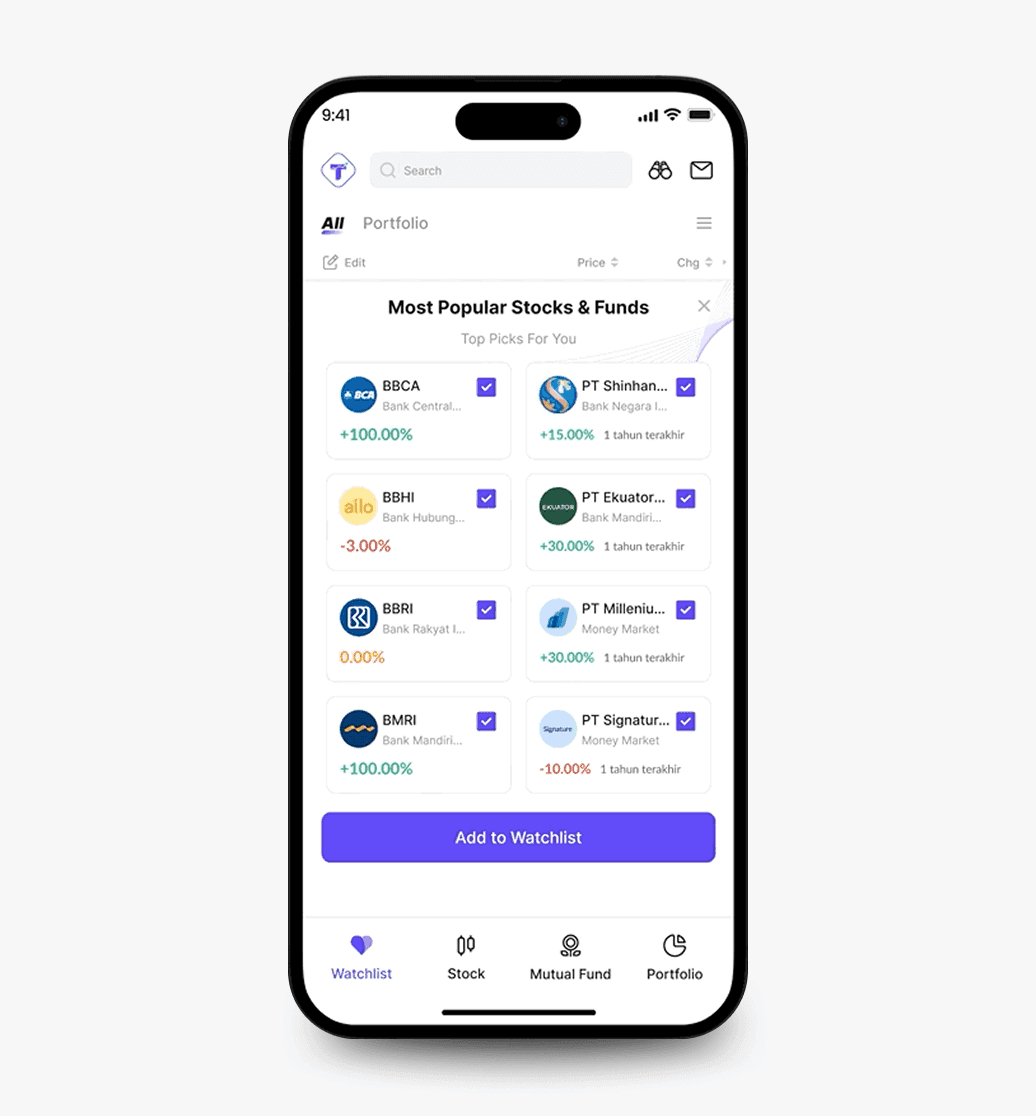
In this feature, users can quickly add recommendations during their first-time experience. We believe that suggesting the most popular stocks and funds will capture users’ attention and encourage them to try the feature.
Popular Recommendation in First Time User experience
In this feature, users can quickly add recommendations during their first-time experience. We believe that suggesting the most popular stocks and funds will capture users’ attention and encourage them to try the feature.
Popular Recommendation in First Time User experience
In this feature, users can quickly add recommendations during their first-time experience. We believe that suggesting the most popular stocks and funds will capture users’ attention and encourage them to try the feature.
Ignore Watchlist Reccomendation
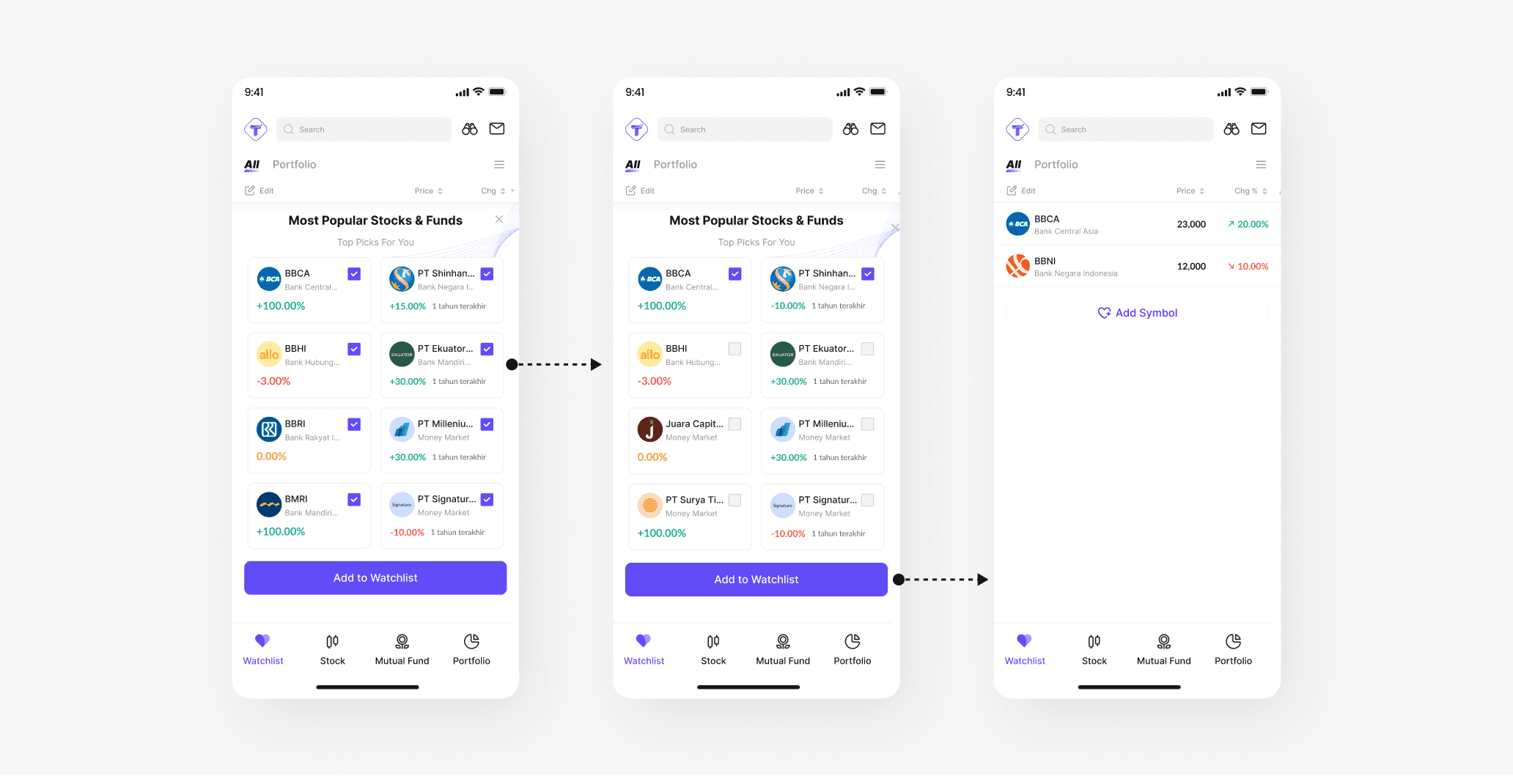
Users can also unselect items to ignore the recommendations and manually add their own items.
Ignore Watchlist Reccomendation
Users can also unselect items to ignore the recommendations and manually add their own items.
Ignore Watchlist Reccomendation
Users can also unselect items to ignore the recommendations and manually add their own items.
Delete and Rename from the Watchlist Group Bottomsheet
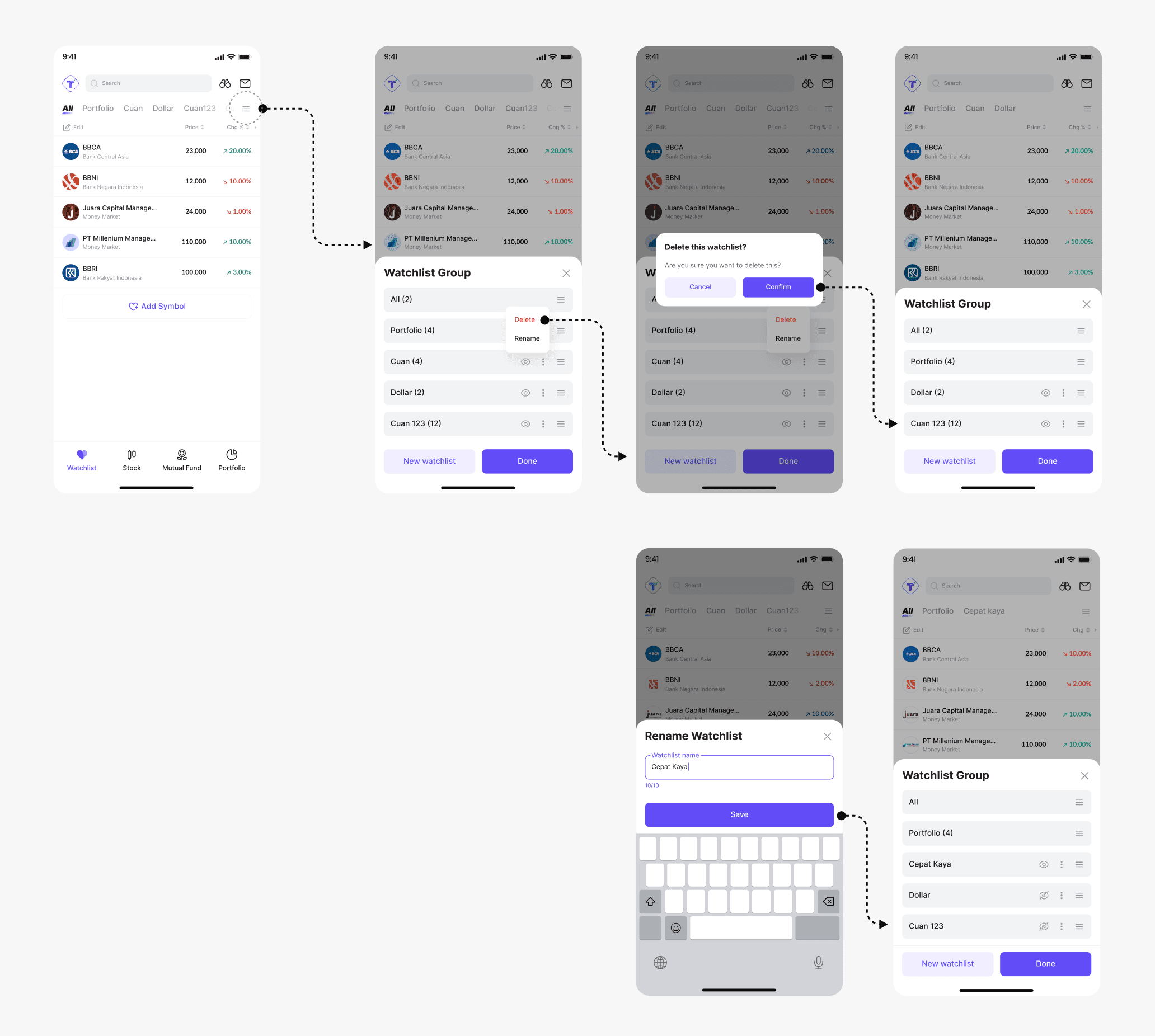
By opening the watchlist group bottom sheet, users can delete or rename the group, hide or show it, and sort its priority.
Delete and Rename from the Watchlist Group Bottomsheet
By opening the watchlist group bottom sheet, users can delete or rename the group, hide or show it, and sort its priority.
Delete and Rename from the Watchlist Group Bottomsheet
By opening the watchlist group bottom sheet, users can delete or rename the group, hide or show it, and sort its priority.
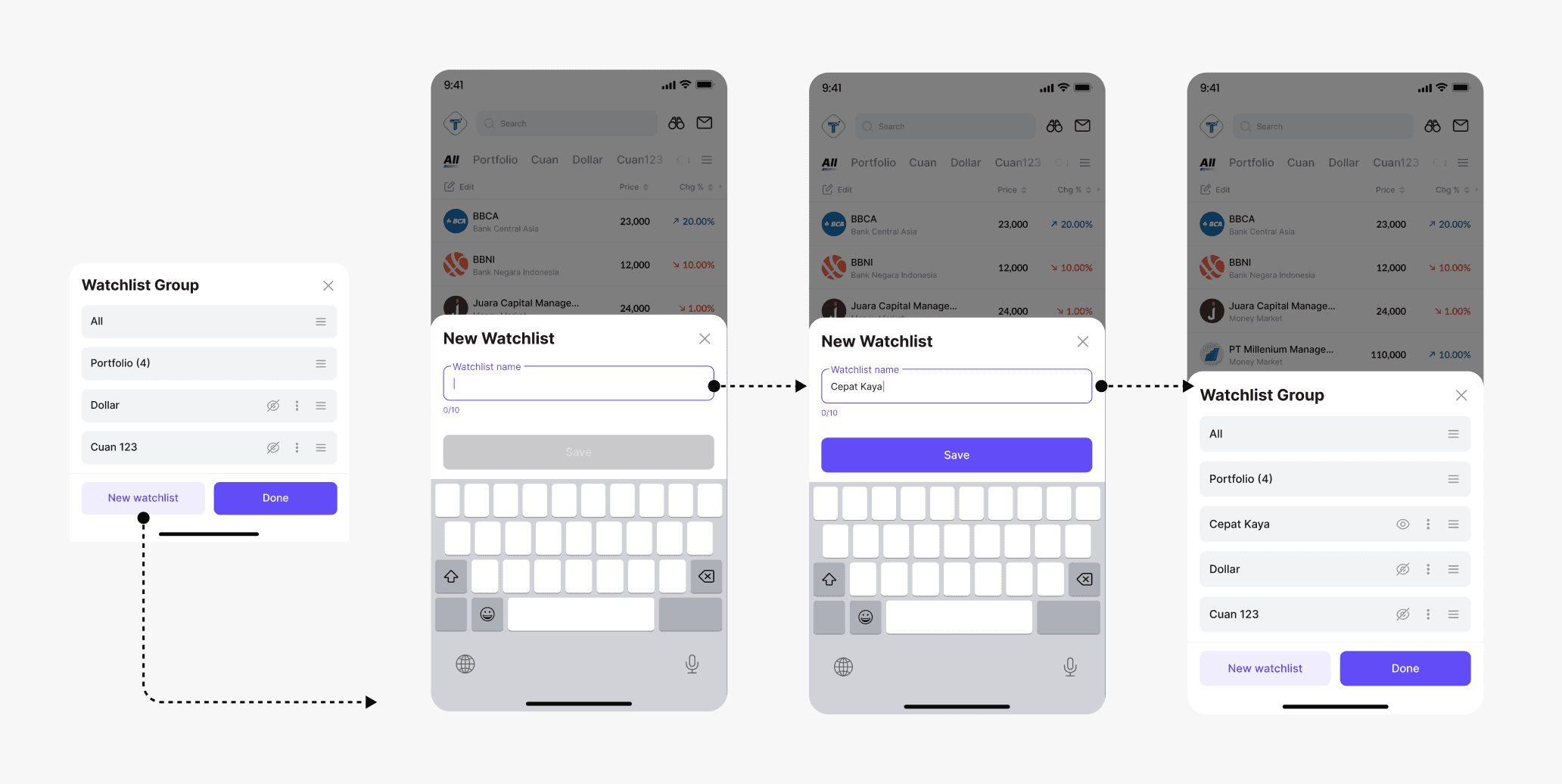
Add New Watchlist in Bottomsheet
Users can also easily add a new watchlist group by clicking the New Watchlist button inside the bottom sheet.
Add New Watchlist in Bottomsheet
Users can also easily add a new watchlist group by clicking the New Watchlist button inside the bottom sheet.
Add New Watchlist in Bottomsheet
Users can also easily add a new watchlist group by clicking the New Watchlist button inside the bottom sheet.
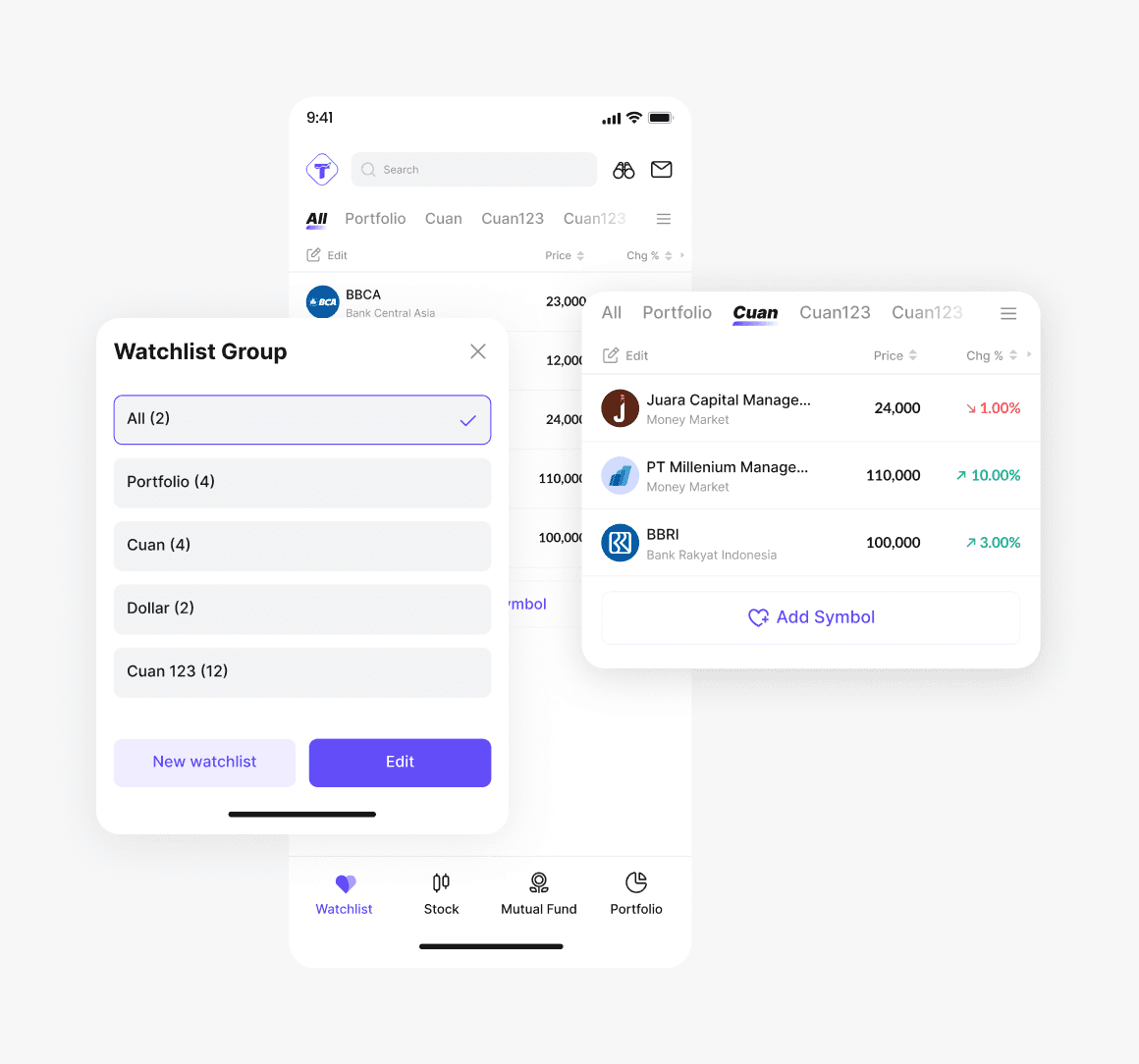
Change Tab
Users can easily switch between watchlist groups by tapping the tab or selecting a group from the watchlist group bottom sheet.
Change Tab
Users can easily switch between watchlist groups by tapping the tab or selecting a group from the watchlist group bottom sheet.
Change Tab
Users can easily switch between watchlist groups by tapping the tab or selecting a group from the watchlist group bottom sheet.
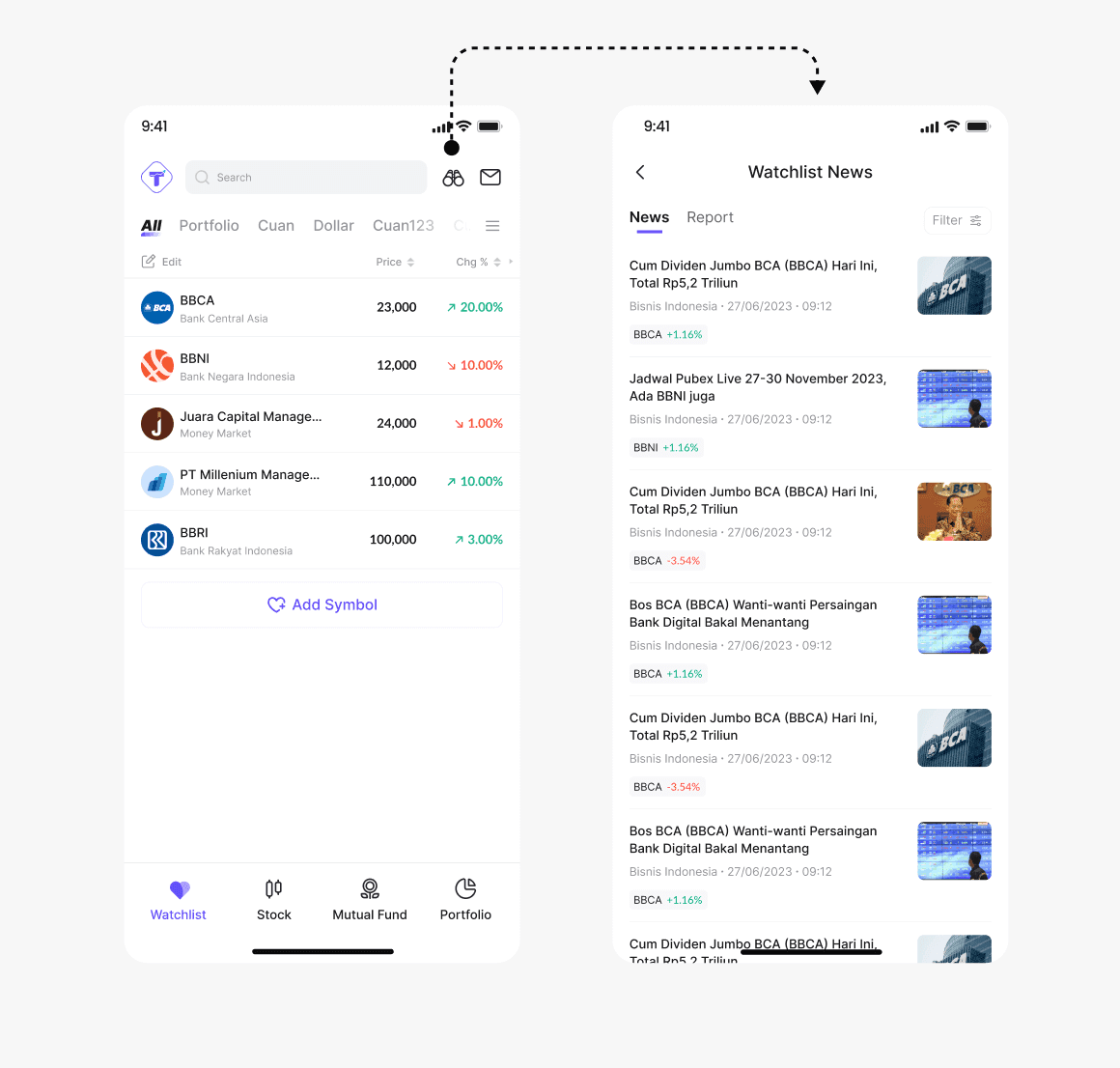
Wathclist News
Users can check watchlist news to see updates related only to the stocks or funds they selected in their watchlist, and they can also filter the news.
Wathclist News
Users can check watchlist news to see updates related only to the stocks or funds they selected in their watchlist, and they can also filter the news.
Wathclist News
Users can check watchlist news to see updates related only to the stocks or funds they selected in their watchlist, and they can also filter the news.
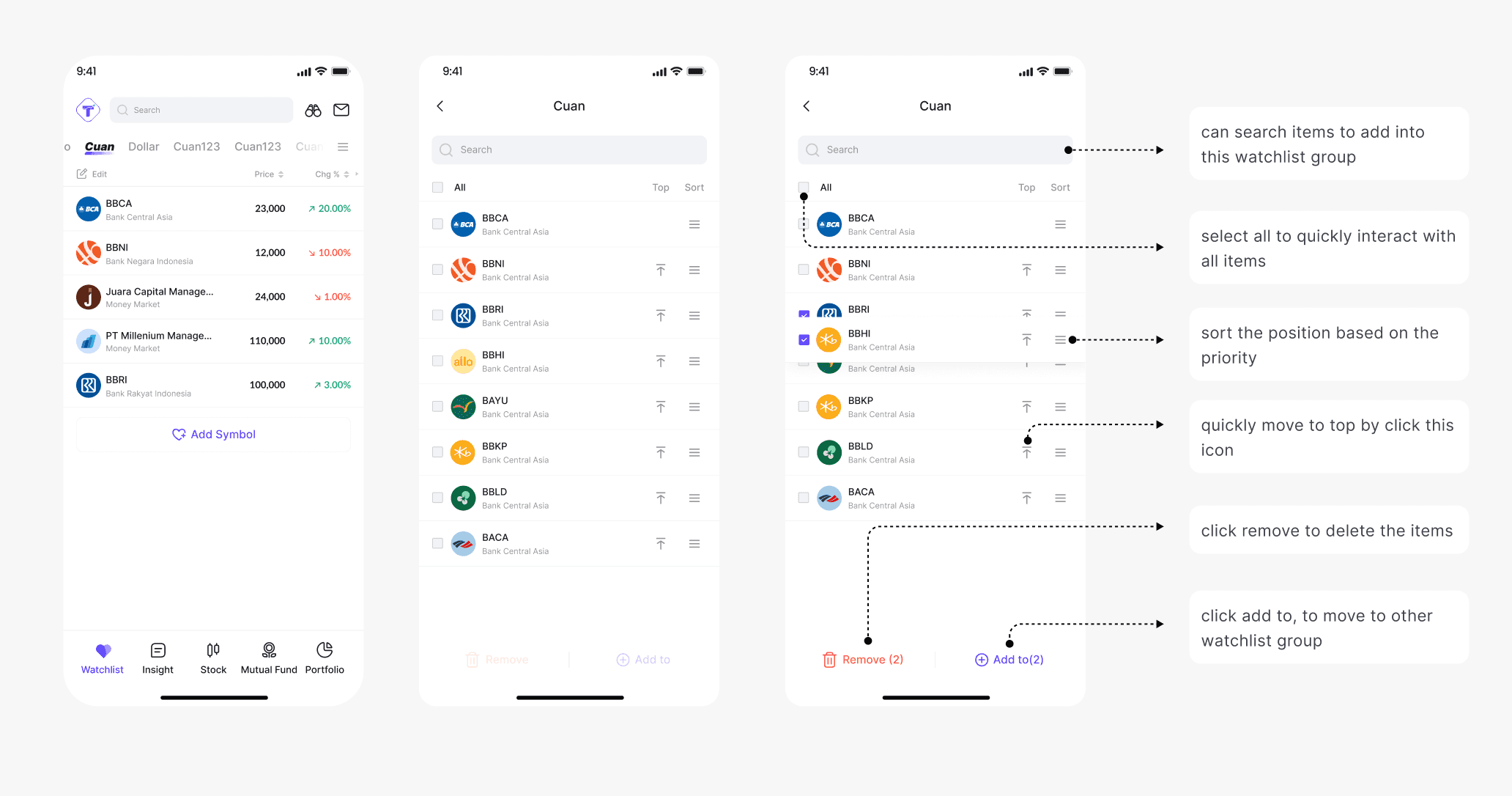
Watchlist Group Settings
In each watchlist, users can edit details by tapping the Edit button. This feature allows users to customize item positions, delete items, and move them to other groups.
Watchlist Group Settings
In each watchlist, users can edit details by tapping the Edit button. This feature allows users to customize item positions, delete items, and move them to other groups.
Watchlist Group Settings
In each watchlist, users can edit details by tapping the Edit button. This feature allows users to customize item positions, delete items, and move them to other groups.
Oh yeah, we also included an easter egg feature for horizontal mode.
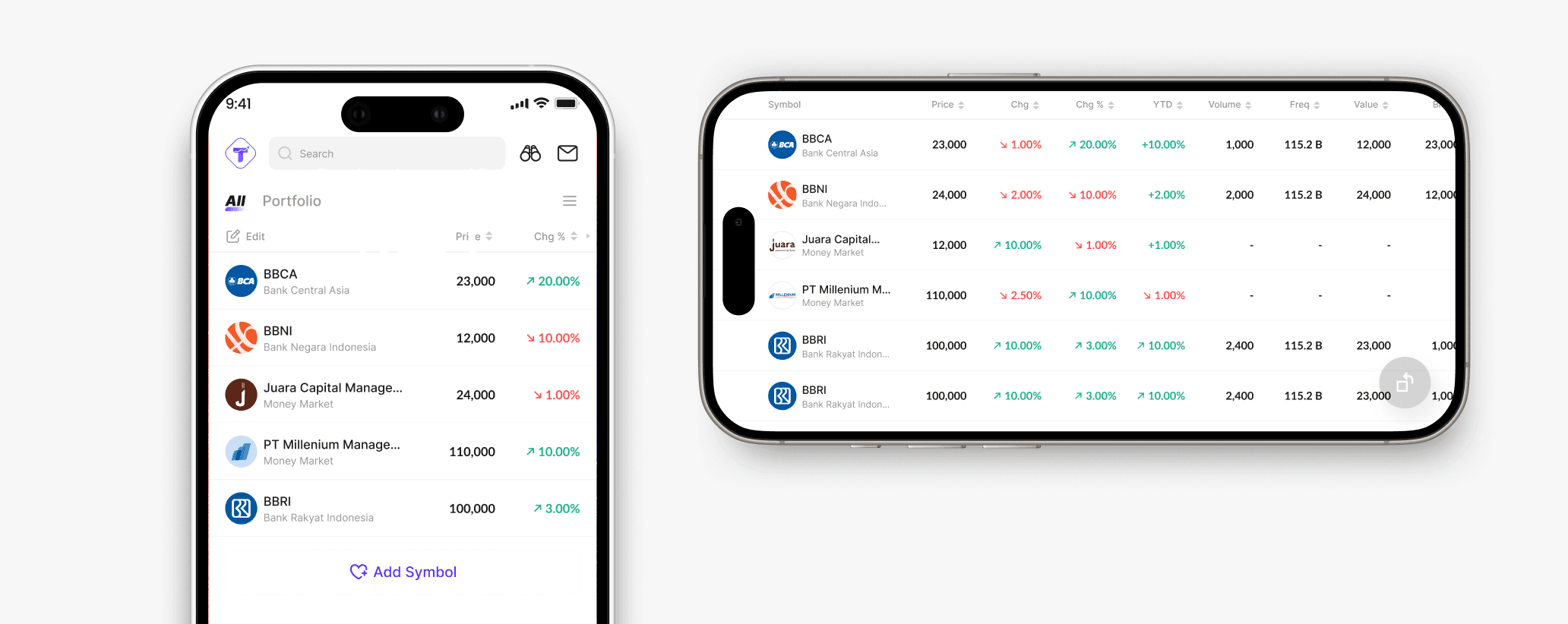
To make the feature more complete and useful, we added an easter egg where users can rotate their phone to horizontal mode to view more detailed data.
Oh yeah, we also included an easter egg feature for horizontal mode.
To make the feature more complete and useful, we added an easter egg where users can rotate their phone to horizontal mode to view more detailed data.
Oh yeah, we also included an easter egg feature for horizontal mode.
To make the feature more complete and useful, we added an easter egg where users can rotate their phone to horizontal mode to view more detailed data.
We also validate our design with Usability Testing method
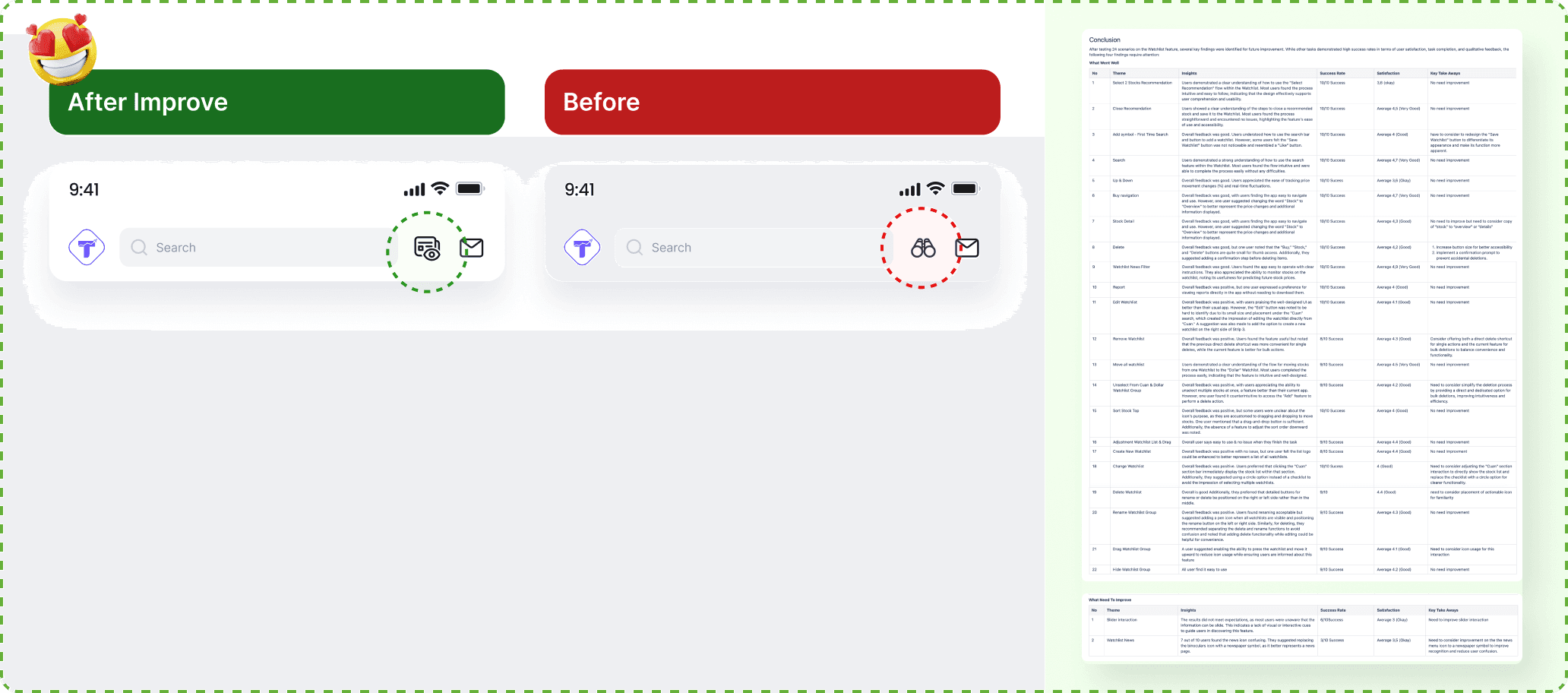
All users preferred Option 1 because the icons are clearer compared to the previous UT design. During testing, users could easily understand the tasks and complete them without issues. Therefore, we decided to use this design for the watchlist feature.
We also validate our design with Usability Testing method
All users preferred Option 1 because the icons are clearer compared to the previous UT design. During testing, users could easily understand the tasks and complete them without issues. Therefore, we decided to use this design for the watchlist feature.
We also validate our design with Usability Testing method
All users preferred Option 1 because the icons are clearer compared to the previous UT design. During testing, users could easily understand the tasks and complete them without issues. Therefore, we decided to use this design for the watchlist feature.
How I document my design for the handover process
The Result
60%
Approximately 60% of new active users interacted with Watchlist
60%
Approximately 60% of new active users interacted with Watchlist
60%
Approximately 60% of new active users interacted with Watchlist
20%
Watchlist driven transactions increased by ~20% in first month
20%
Watchlist driven transactions increased by ~20% in first month
20%
Watchlist driven transactions increased by ~20% in first month
Retention
Still oberving and it have a strong repeat usage in the first month
Retention
Still oberving and it have a strong repeat usage in the first month
Retention
Still oberving and it have a strong repeat usage in the first month