Design Complex Individual Stock Feature
Product
Finance Technology
Product
Finance Technology
Company
Tuntun Sekuritas
Company
Tuntun Sekuritas
Role
Sr. Product Designer
Role
Sr. Product Designer
Project Background
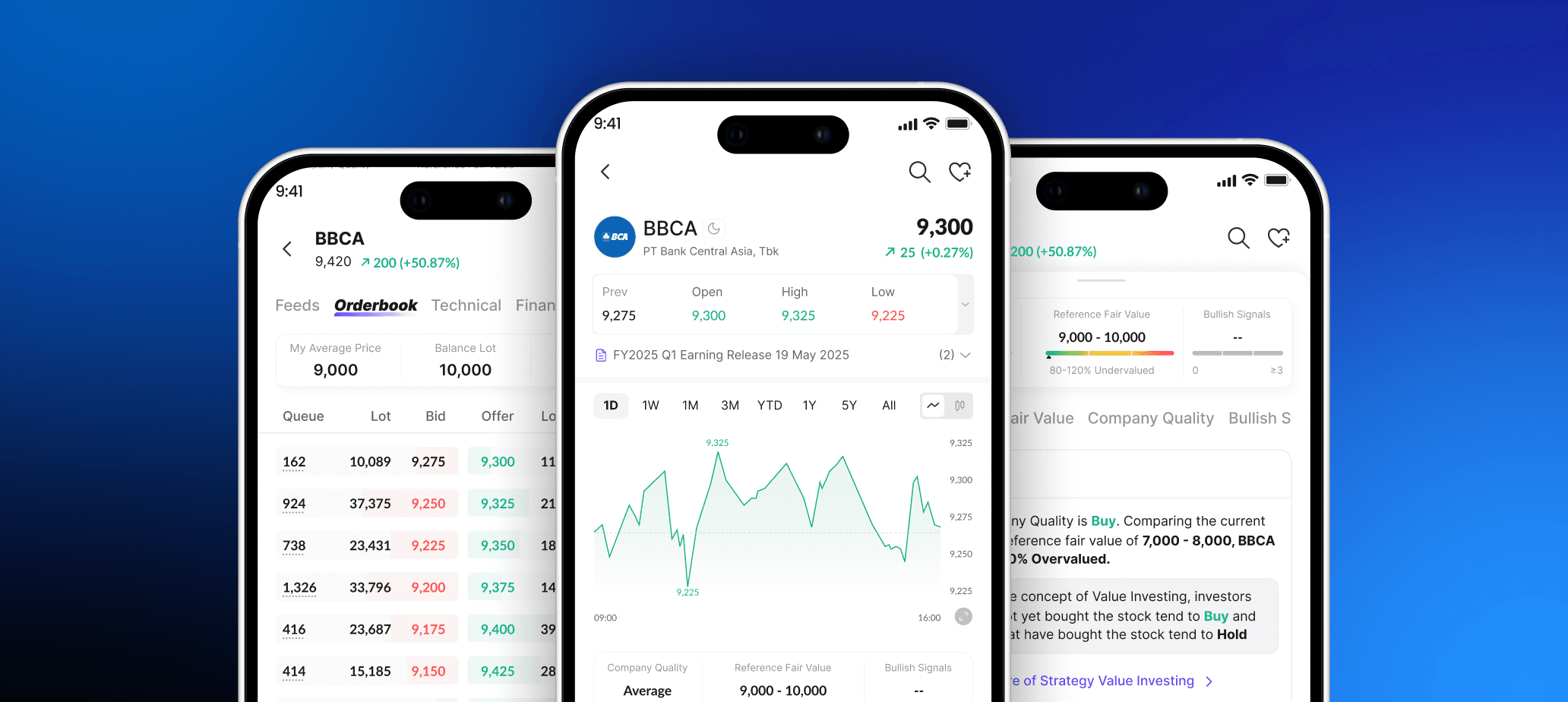
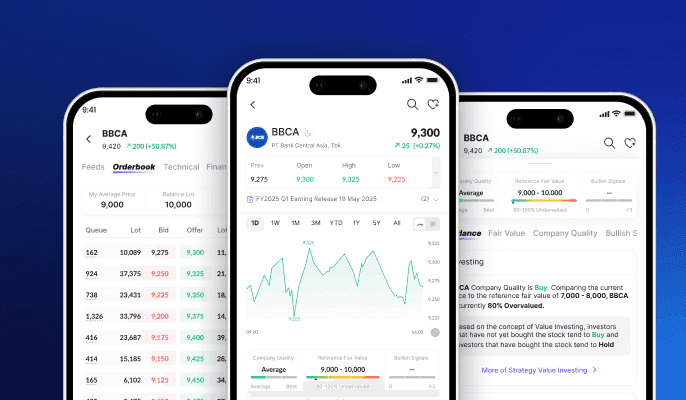
In every finance app, there is a stock page that provides comprehensive information, such as stock price movements, historical performance, company financials, and related news. Tuntun aims to build this feature to give users complete and reliable stock insights in one place.
Project Background
In every finance app, there is a stock page that provides comprehensive information, such as stock price movements, historical performance, company financials, and related news. Tuntun aims to build this feature to give users complete and reliable stock insights in one place.
Project Objective
The objective of this project is to create an individual stock page that allows users to monitor stock performance in more detail, access financial reports, and explore relevant news on the same page.
Project Objective
The objective of this project is to create an individual stock page that allows users to monitor stock performance in more detail, access financial reports, and explore relevant news on the same page.
Business Impact After Released
65%
Increased Stock Page engagement by 65% within 7 days
65%
Increased Stock Page engagement by 65% within 7 days
65%
Increased Stock Page engagement by 65% within 7 days
58%
Drove +58% higher return visits to stock page within 7 days
58%
Drove +58% higher return visits to stock page within 7 days
58%
Drove +58% higher return visits to stock page within 7 days
14%
Improved Buy/Sell(Transaction) conversion by 14%
14%
Improved Buy/Sell(Transaction) conversion by 14%
14%
Improved Buy/Sell(Transaction) conversion by 14%
Who are the Users?

Advanced Users
2+ years of experience, use Finance App more often to invest & trade
Advanced Users
2+ years of experience, use Finance App more often to invest & trade

Beginner Users
0-2 years of experience who are not familiar with finance industry/apps.
Beginner Users
0-2 years of experience who are not familiar with finance industry/apps.
Gather Requirement from Stakeholders
Stakeholders expect this feature to meet user needs and be data-driven. Since the app is designed for Indonesian users and most of them use Stockbit, our stock page will adopt several relevant features from Stockbit based on user needs. At the same time, we aim to identify key differentiating features that are truly useful when designing the Tuntun stock page.
Gather Requirement from Stakeholders
Stakeholders expect this feature to meet user needs and be data-driven. Since the app is designed for Indonesian users and most of them use Stockbit, our stock page will adopt several relevant features from Stockbit based on user needs. At the same time, we aim to identify key differentiating features that are truly useful when designing the Tuntun stock page.
Gather Requirement from Stakeholders
Stakeholders expect this feature to meet user needs and be data-driven. Since the app is designed for Indonesian users and most of them use Stockbit, our stock page will adopt several relevant features from Stockbit based on user needs. At the same time, we aim to identify key differentiating features that are truly useful when designing the Tuntun stock page.
Gather Requirement from Our Real Potential Users
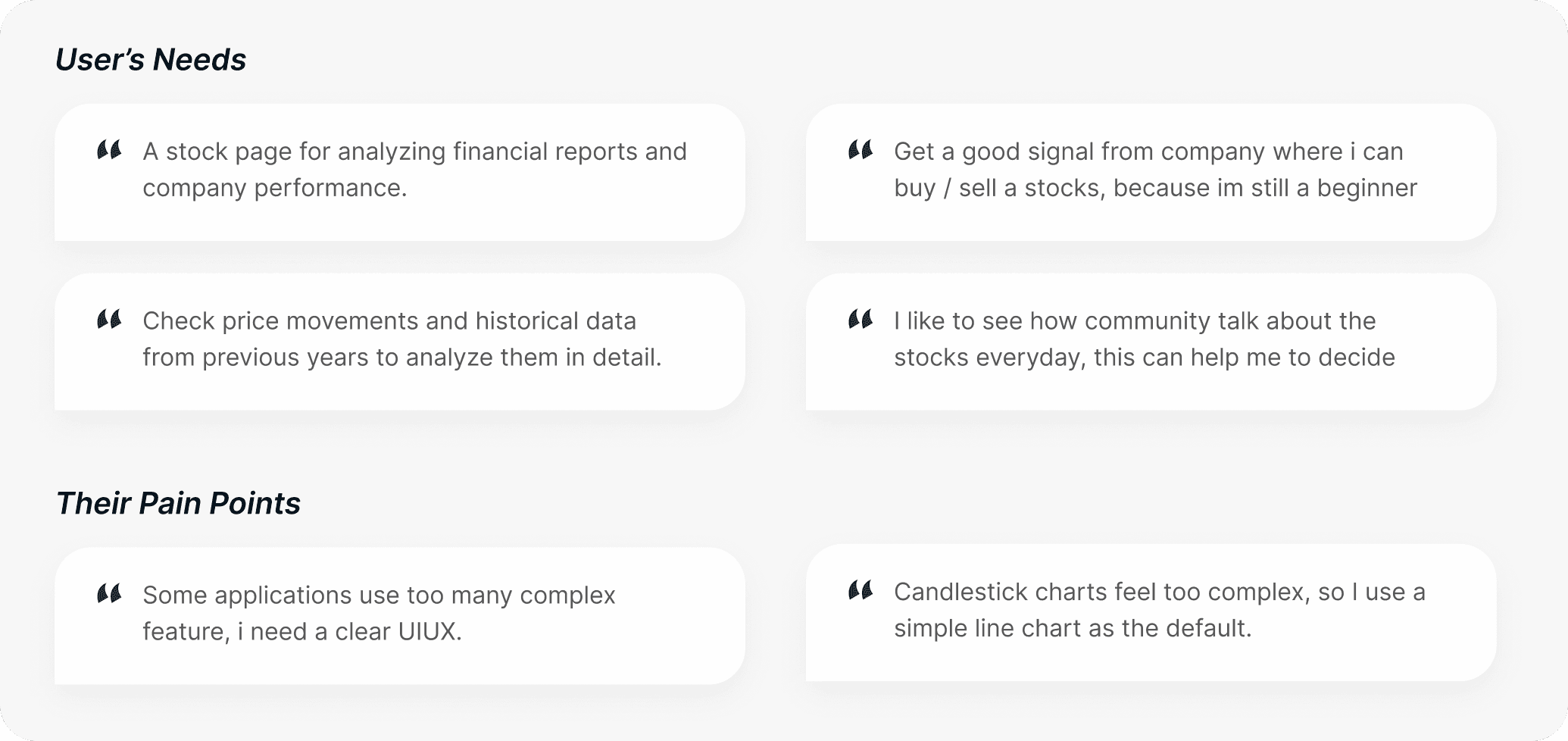
I conducted interviews with 10 users—5 advanced users and 5 beginner users. The goal was to understand their needs, motivations, and pain points when using finance apps for this feature. The results are as follows:
Gather Requirement from Our Real Potential Users
I conducted interviews with 10 users—5 advanced users and 5 beginner users. The goal was to understand their needs, motivations, and pain points when using finance apps for this feature. The results are as follows:
Gather Requirement from Our Real Potential Users
I conducted interviews with 10 users—5 advanced users and 5 beginner users. The goal was to understand their needs, motivations, and pain points when using finance apps for this feature. The results are as follows:
Explore Concepts
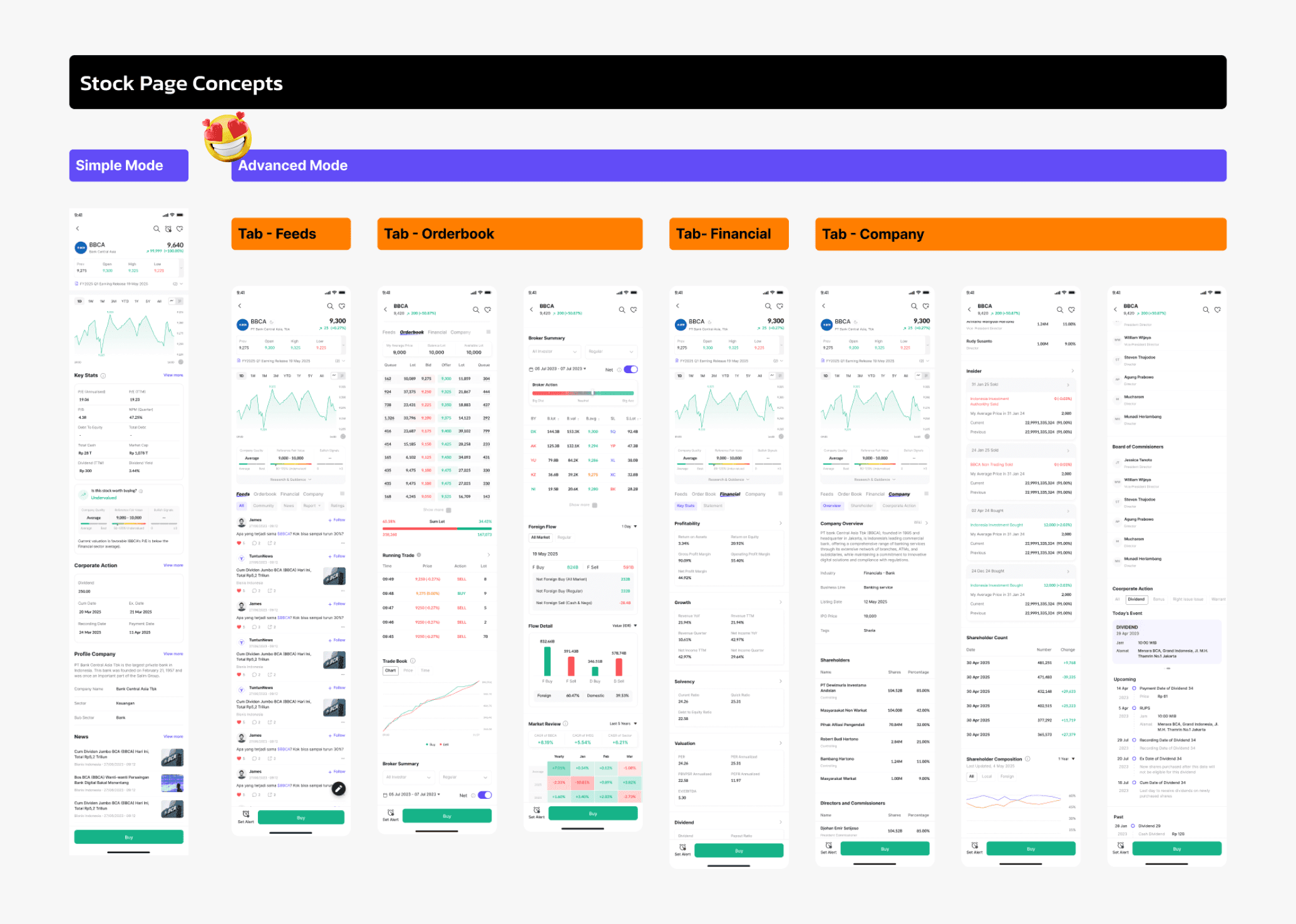
I explored two concepts with two different modes: a simple version to make the feature easy to use, and an advanced mode focused on more advanced features. I also asked users to complete a quick survey for both concepts to ensure they understood the interactions.
Results: Users preferred the advanced mode because it feels more complete and familiar. They also understood the interactions well and appreciated custom tabs for flexible prioritization.
Explore Concepts
I explored two concepts with two different modes: a simple version to make the feature easy to use, and an advanced mode focused on more advanced features. I also asked users to complete a quick survey for both concepts to ensure they understood the interactions.
Results: Users preferred the advanced mode because it feels more complete and familiar. They also understood the interactions well and appreciated custom tabs for flexible prioritization.
Explore Concepts
I explored two concepts with two different modes: a simple version to make the feature easy to use, and an advanced mode focused on more advanced features. I also asked users to complete a quick survey for both concepts to ensure they understood the interactions.
Results: Users preferred the advanced mode because it feels more complete and familiar. They also understood the interactions well and appreciated custom tabs for flexible prioritization.
Visual Principle

Familiar & Recognizable Design
A familiar layout and interaction help users use the feature faster without a learning curve.
Familiar & Recognizable Design
A familiar layout and interaction help users use the feature faster without a learning curve.

Comprehensive but Simple
Comprehensive stock information presented in a simple, easy-to-use design.
Comprehensive but Simple
Comprehensive stock information presented in a simple, easy-to-use design.

Flexible & User Control
Users can customize and prioritize features based on their needs, allowing them to focus on what matters most.
Flexible & User Control
Users can customize and prioritize features based on their needs, allowing them to focus on what matters most.
Benchmark Process
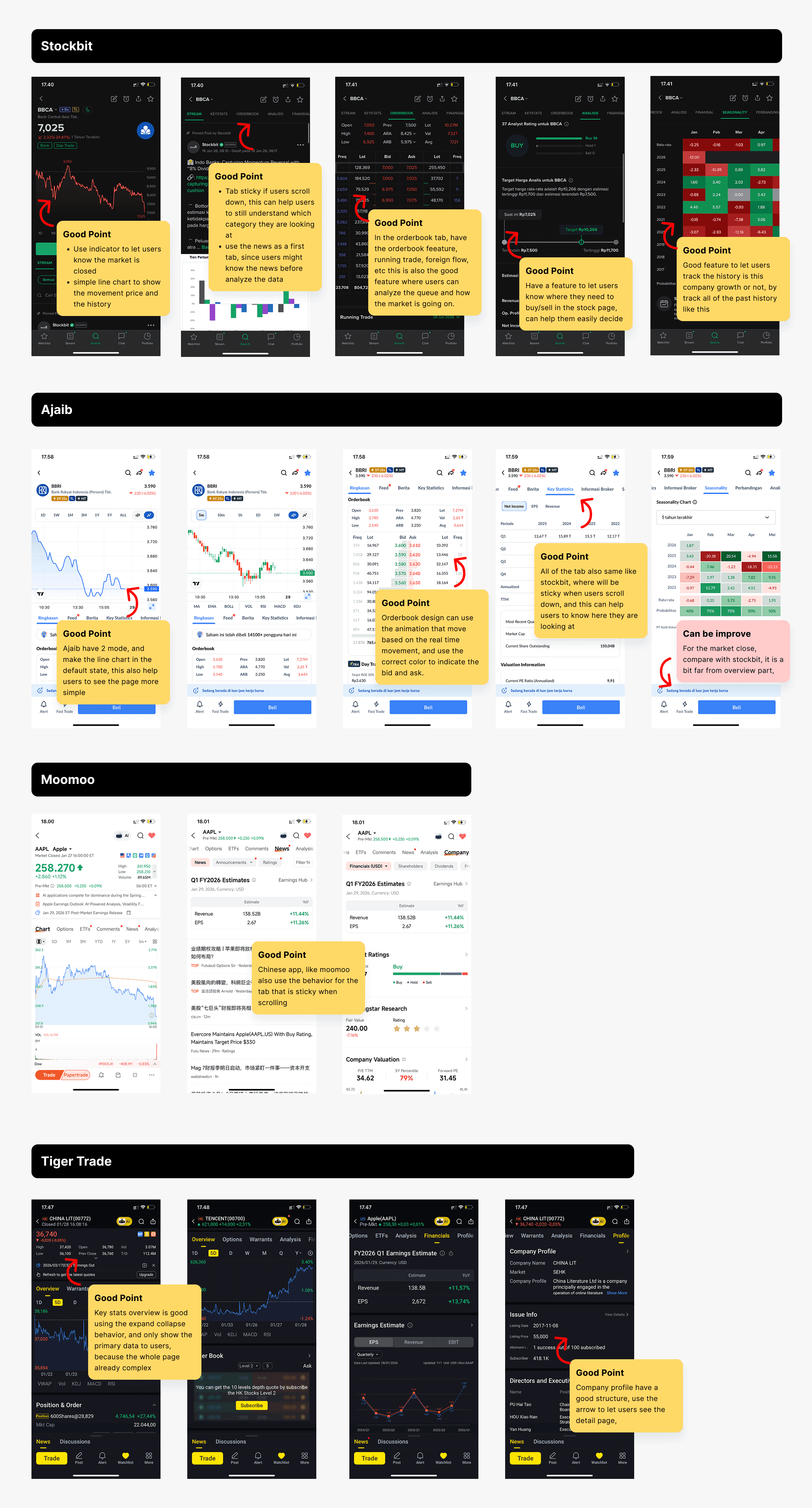
I benchmarked the stock page features of leading Indonesian fintech apps, Stockbit and Ajaib, as well as apps from China, to study user behavior. These insights were used to guide the team in designing relevant and effective UX for the Tuntun stock page.
Benchmark Process
I benchmarked the stock page features of leading Indonesian fintech apps, Stockbit and Ajaib, as well as apps from China, to study user behavior. These insights were used to guide the team in designing relevant and effective UX for the Tuntun stock page.
Benchmark Process
I benchmarked the stock page features of leading Indonesian fintech apps, Stockbit and Ajaib, as well as apps from China, to study user behavior. These insights were used to guide the team in designing relevant and effective UX for the Tuntun stock page.
Jobs to Be Done and Features to Design
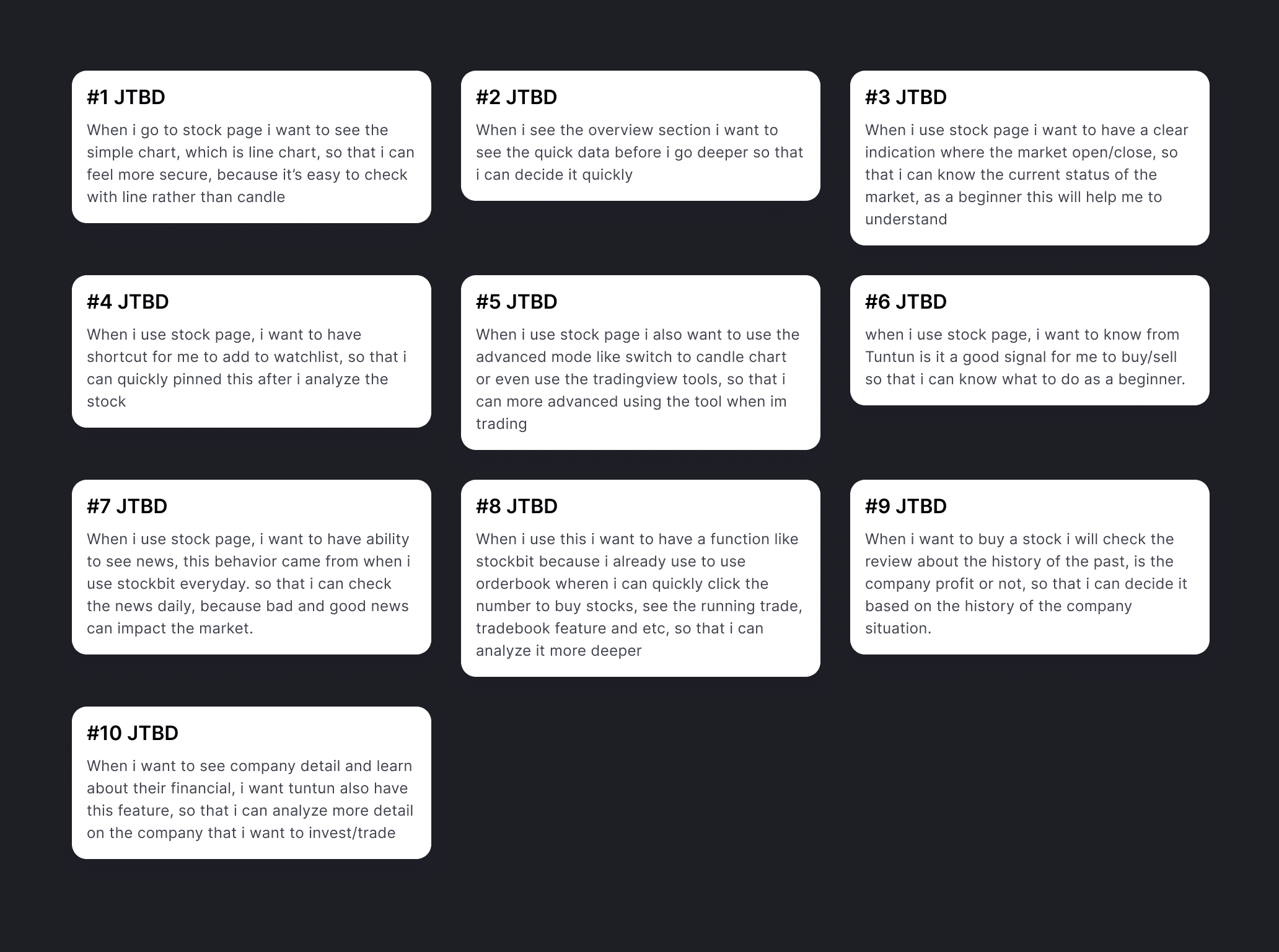
After gathering all the needs and identifying the UI concept to design, my team and I mapped out all use cases using the JTBD framework to better understand the MVP features.
Jobs to Be Done and Features to Design
After gathering all the needs and identifying the UI concept to design, my team and I mapped out all use cases using the JTBD framework to better understand the MVP features.
Jobs to Be Done and Features to Design
After gathering all the needs and identifying the UI concept to design, my team and I mapped out all use cases using the JTBD framework to better understand the MVP features.
Final Design
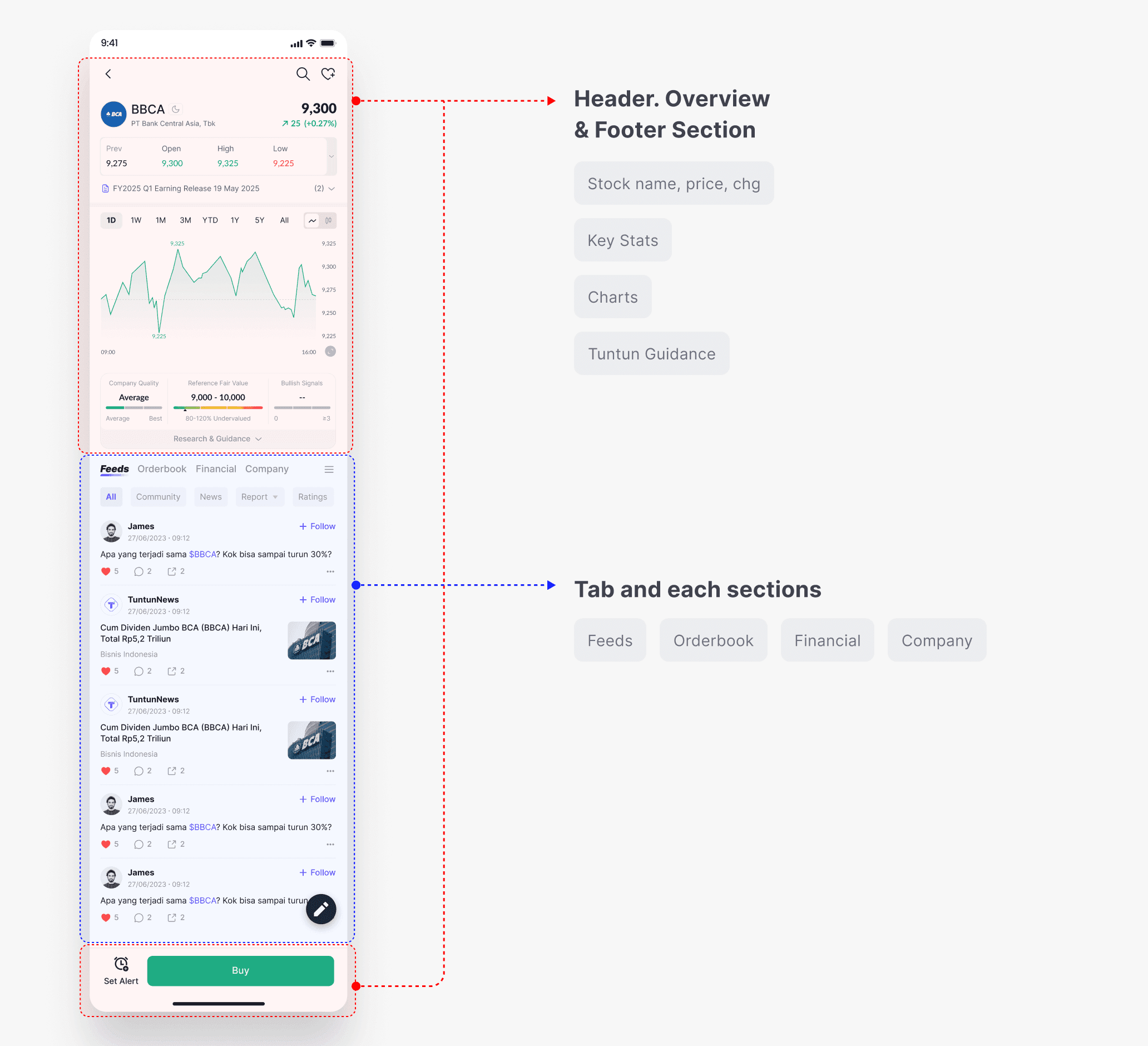
I will explain this feature using two structures to describe the design.
Final Design
I will explain this feature using two structures to describe the design.
Final Design
I will explain this feature using two structures to describe the design.
Header Parts Explanation
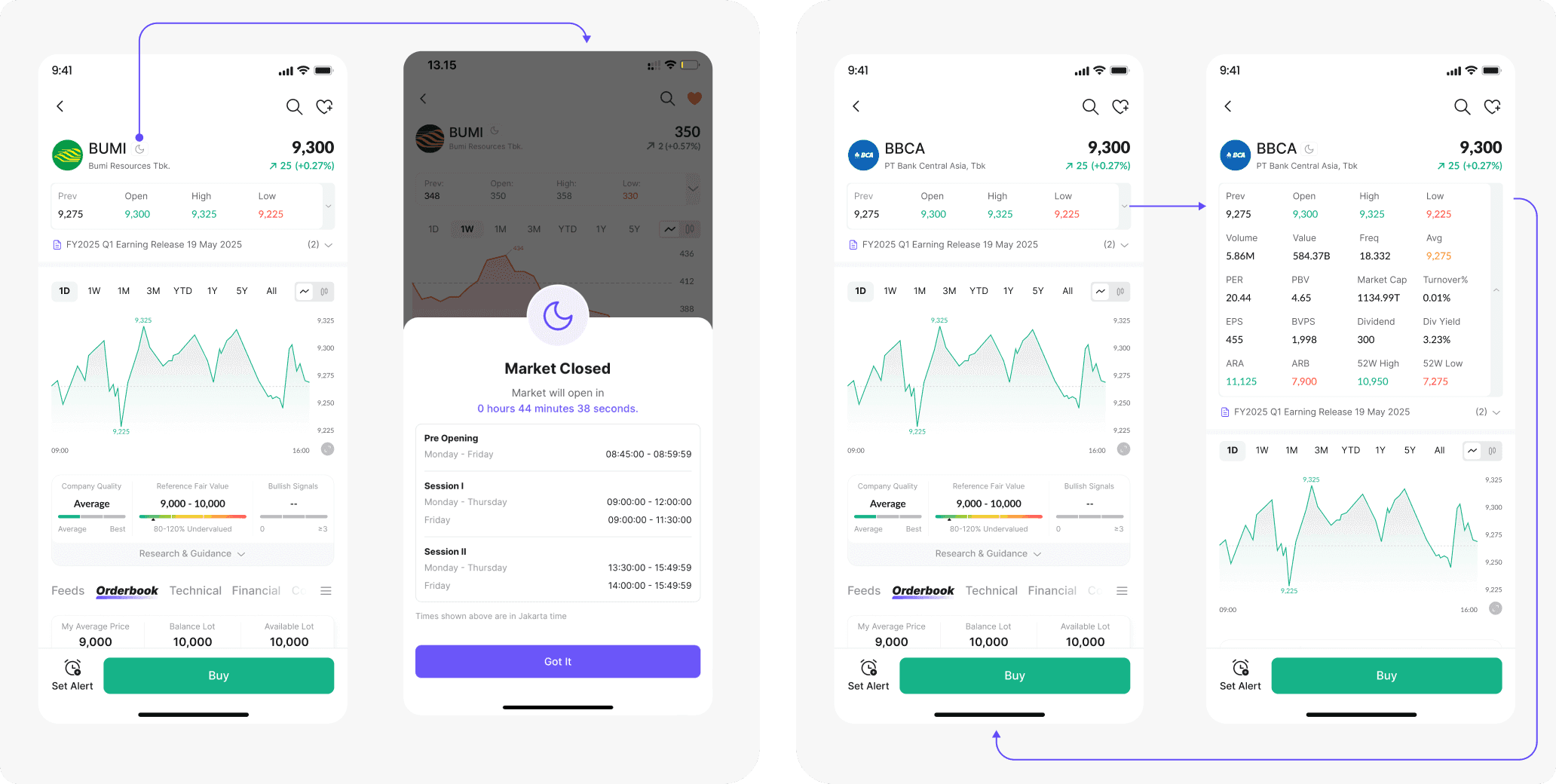
If the market is closed, we show a moon icon on the stock page. Users can tap the icon to see the remaining countdown time until the market opens.
Below the stock price and change information, users can also see a Key Stats shortcut that provides a recap of how the market performed during the day. This section can be expanded to view more detailed recap data.
Header Parts Explanation
If the market is closed, we show a moon icon on the stock page. Users can tap the icon to see the remaining countdown time until the market opens.
Below the stock price and change information, users can also see a Key Stats shortcut that provides a recap of how the market performed during the day. This section can be expanded to view more detailed recap data.
Header Parts Explanation
If the market is closed, we show a moon icon on the stock page. Users can tap the icon to see the remaining countdown time until the market opens.
Below the stock price and change information, users can also see a Key Stats shortcut that provides a recap of how the market performed during the day. This section can be expanded to view more detailed recap data.
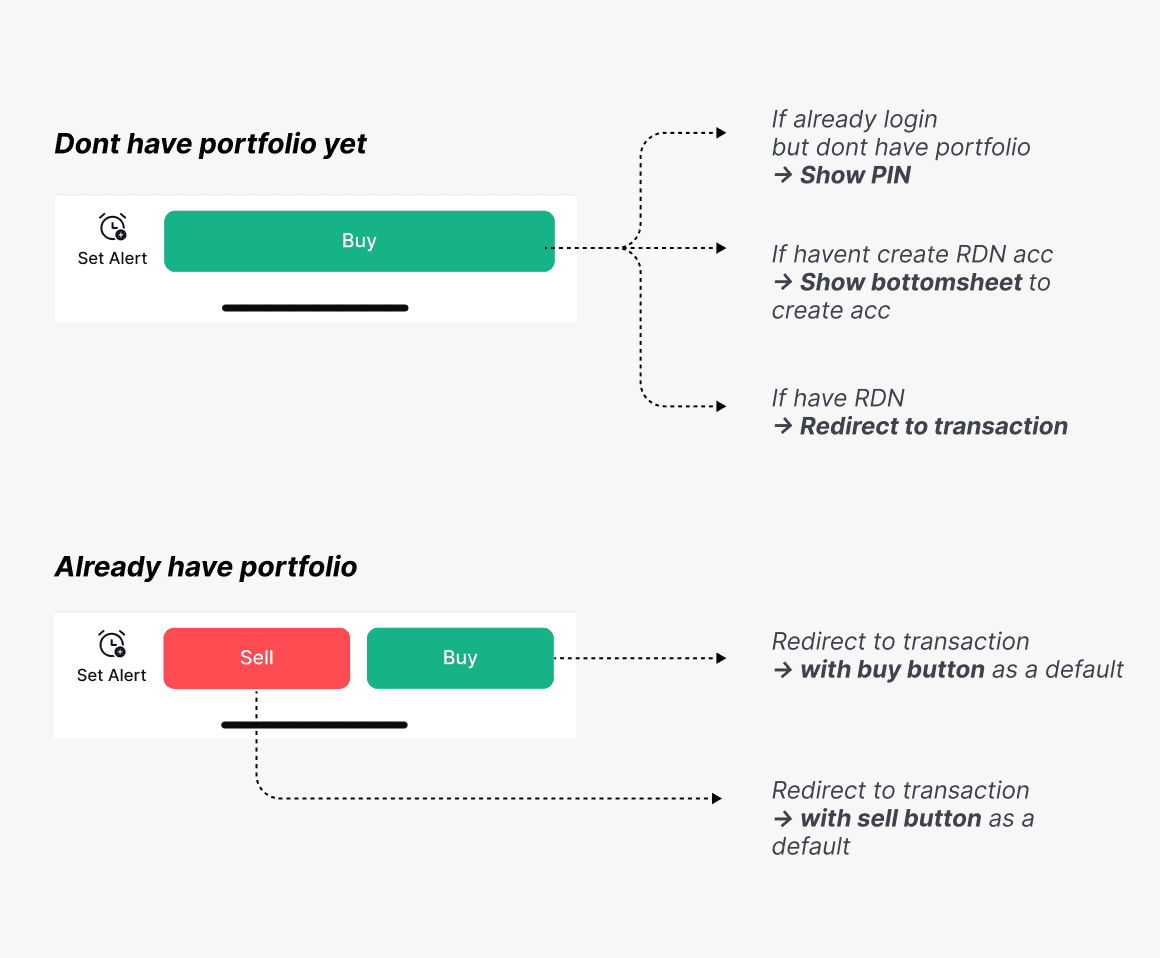
Differentiate the Button Variation
This helps users have a clear journey through every state, avoiding misunderstandings and confusion across all use cases.
Differentiate the Button Variation
This helps users have a clear journey through every state, avoiding misunderstandings and confusion across all use cases.
Differentiate the Button Variation
This helps users have a clear journey through every state, avoiding misunderstandings and confusion across all use cases.
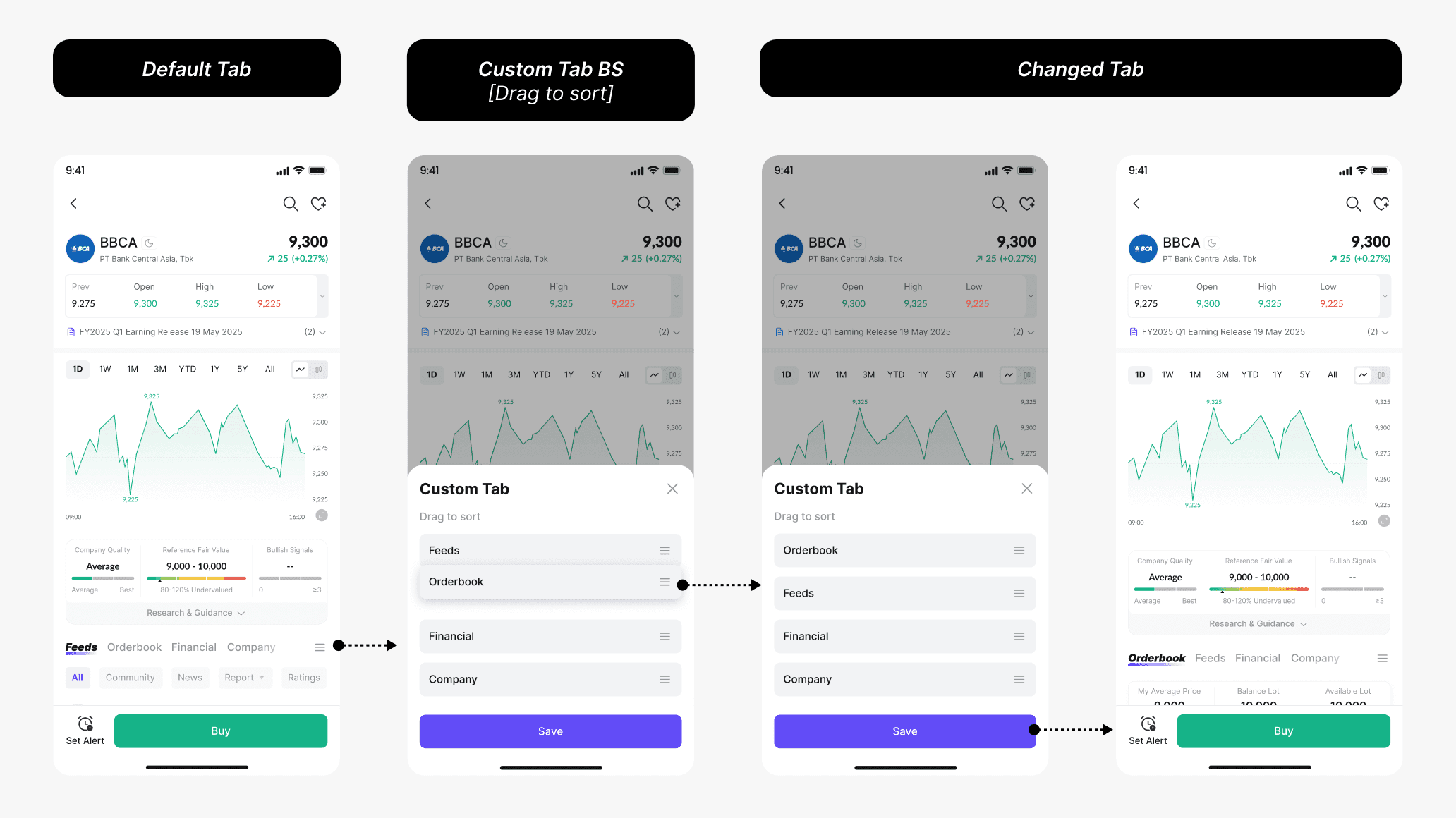
Custom Tab Feature
I also designed a custom tab feature. The idea came from user research, which showed that users have different priorities. Some prefer feeds as their main focus after viewing the overview section, while others prioritize financial reports or the order book when making buying decisions. All of these needs are equally valid. Therefore, my team and I decided to create a custom tab feature that allows users to set and manage their own priorities.
Custom Tab Feature
I also designed a custom tab feature. The idea came from user research, which showed that users have different priorities. Some prefer feeds as their main focus after viewing the overview section, while others prioritize financial reports or the order book when making buying decisions. All of these needs are equally valid. Therefore, my team and I decided to create a custom tab feature that allows users to set and manage their own priorities.
Custom Tab Feature
I also designed a custom tab feature. The idea came from user research, which showed that users have different priorities. Some prefer feeds as their main focus after viewing the overview section, while others prioritize financial reports or the order book when making buying decisions. All of these needs are equally valid. Therefore, my team and I decided to create a custom tab feature that allows users to set and manage their own priorities.
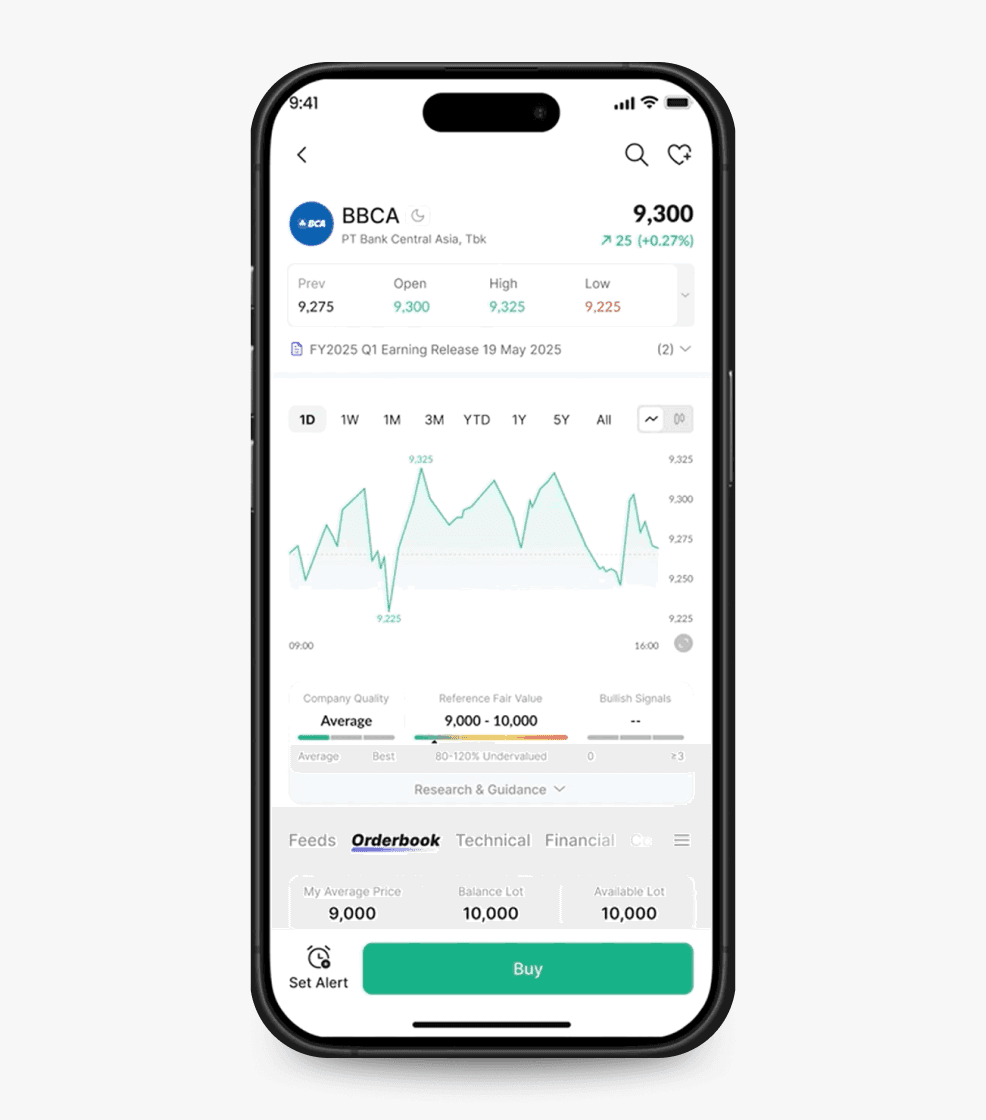
Tuntun Guidance
Here, users can use this feature to analyze insights provided by the Tuntun team. We give information to help users see whether a stock has a strong signal for investing or trading.
This is a flagship feature on the stock page and is not yet available in other finance apps.
Tuntun Guidance
Here, users can use this feature to analyze insights provided by the Tuntun team. We give information to help users see whether a stock has a strong signal for investing or trading.
This is a flagship feature on the stock page and is not yet available in other finance apps.
Tuntun Guidance
Here, users can use this feature to analyze insights provided by the Tuntun team. We give information to help users see whether a stock has a strong signal for investing or trading.
This is a flagship feature on the stock page and is not yet available in other finance apps.
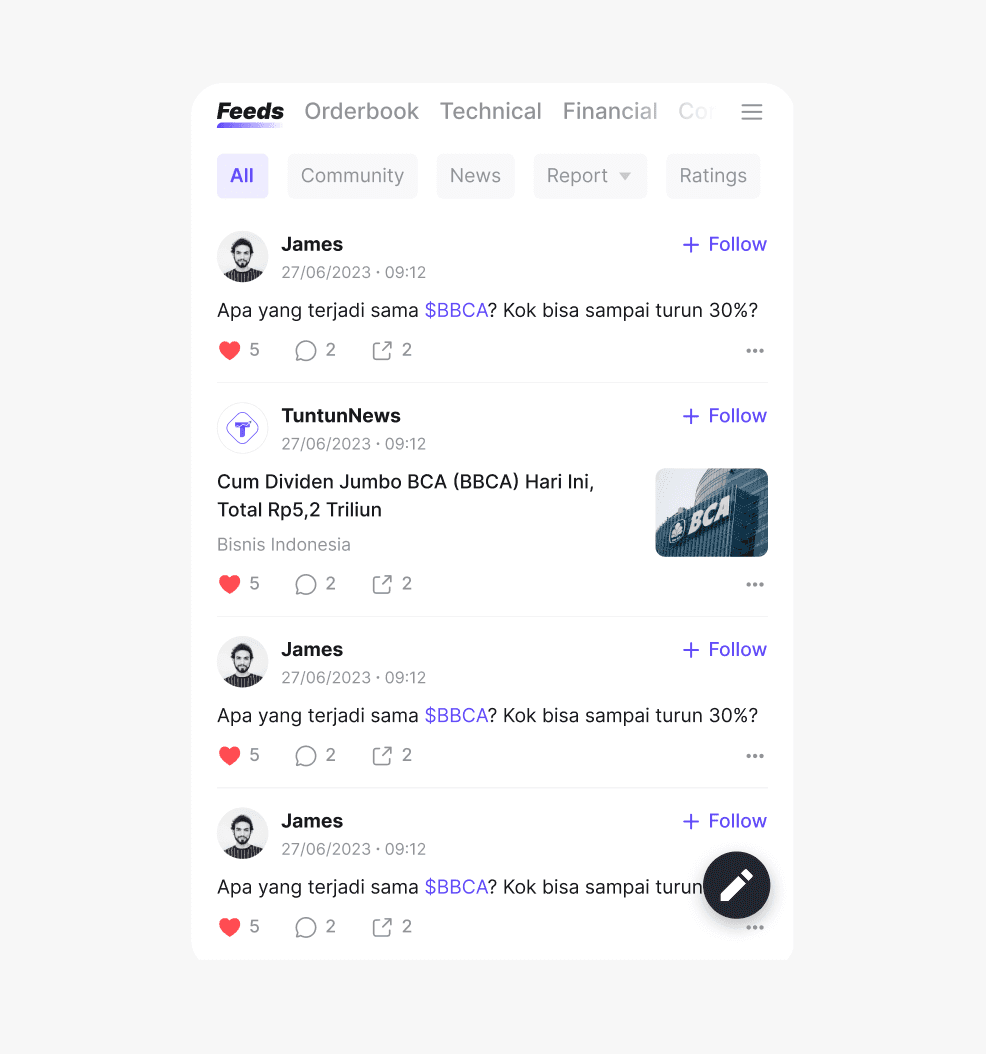
Feeds Feature
Within the individual stock page, we also added a feed feature, including news that users can view and a community discussion for each stock. Users can even share their own insights by tapping the comment icon.
Feeds Feature
Within the individual stock page, we also added a feed feature, including news that users can view and a community discussion for each stock. Users can even share their own insights by tapping the comment icon.
Feeds Feature
Within the individual stock page, we also added a feed feature, including news that users can view and a community discussion for each stock. Users can even share their own insights by tapping the comment icon.
Other Order Book Features
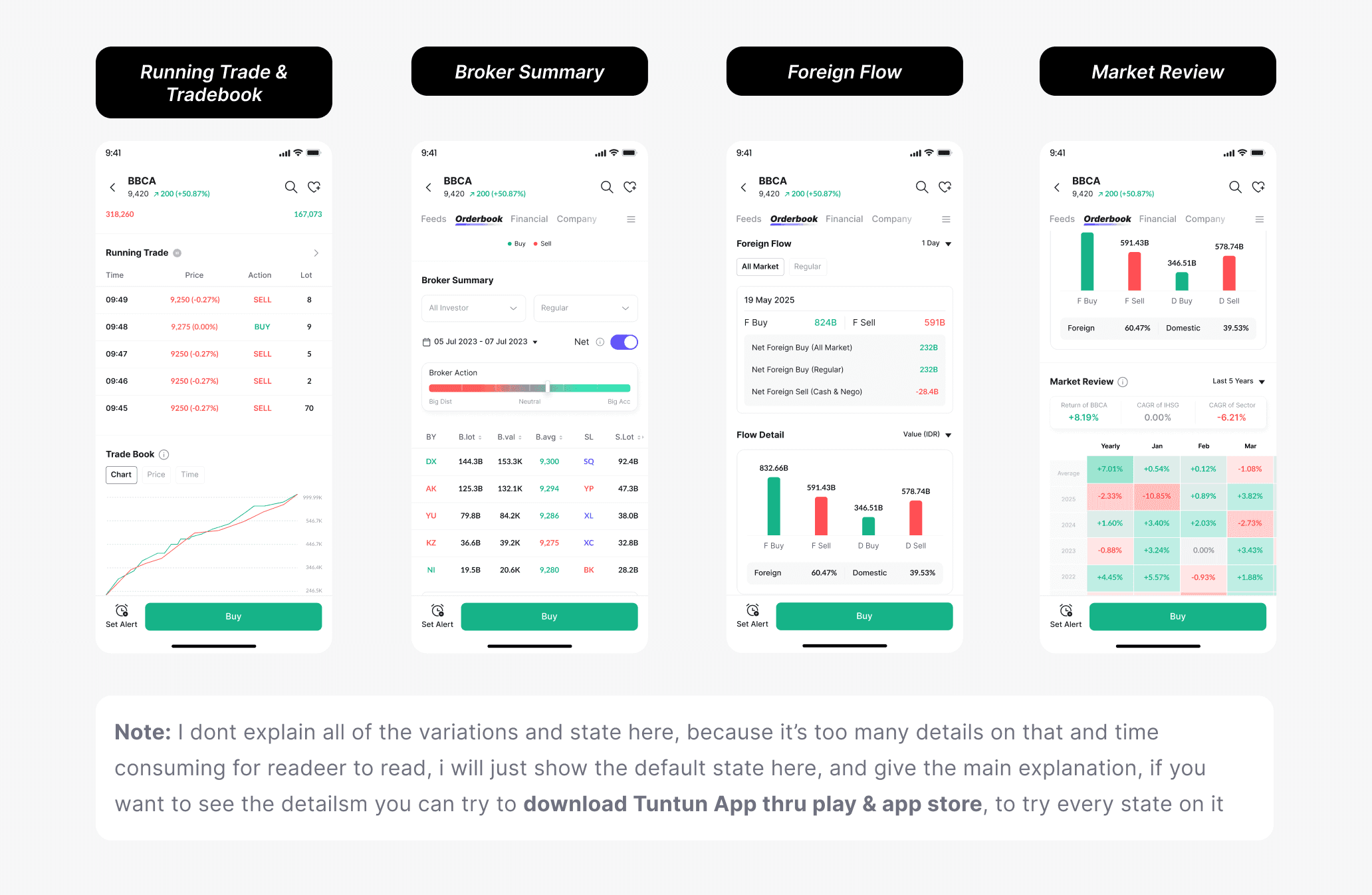
Running Trade: Displays real-time buy and sell transactions so users can monitor market activity and price movements.
Tradebook: Provides a summary of trading data for a specific period, such as opening and closing prices, volume, and transaction value.
Foreign Flow: Shows buying and selling activity by foreign investors to help users understand market sentiment.
Market Review: Offers a daily market summary with key insights to help users understand overall market trends.
Other Order Book Features
Running Trade: Displays real-time buy and sell transactions so users can monitor market activity and price movements.
Tradebook: Provides a summary of trading data for a specific period, such as opening and closing prices, volume, and transaction value.
Foreign Flow: Shows buying and selling activity by foreign investors to help users understand market sentiment.
Market Review: Offers a daily market summary with key insights to help users understand overall market trends.
Other Order Book Features
Running Trade: Displays real-time buy and sell transactions so users can monitor market activity and price movements.
Tradebook: Provides a summary of trading data for a specific period, such as opening and closing prices, volume, and transaction value.
Foreign Flow: Shows buying and selling activity by foreign investors to help users understand market sentiment.
Market Review: Offers a daily market summary with key insights to help users understand overall market trends.
Financial Tab
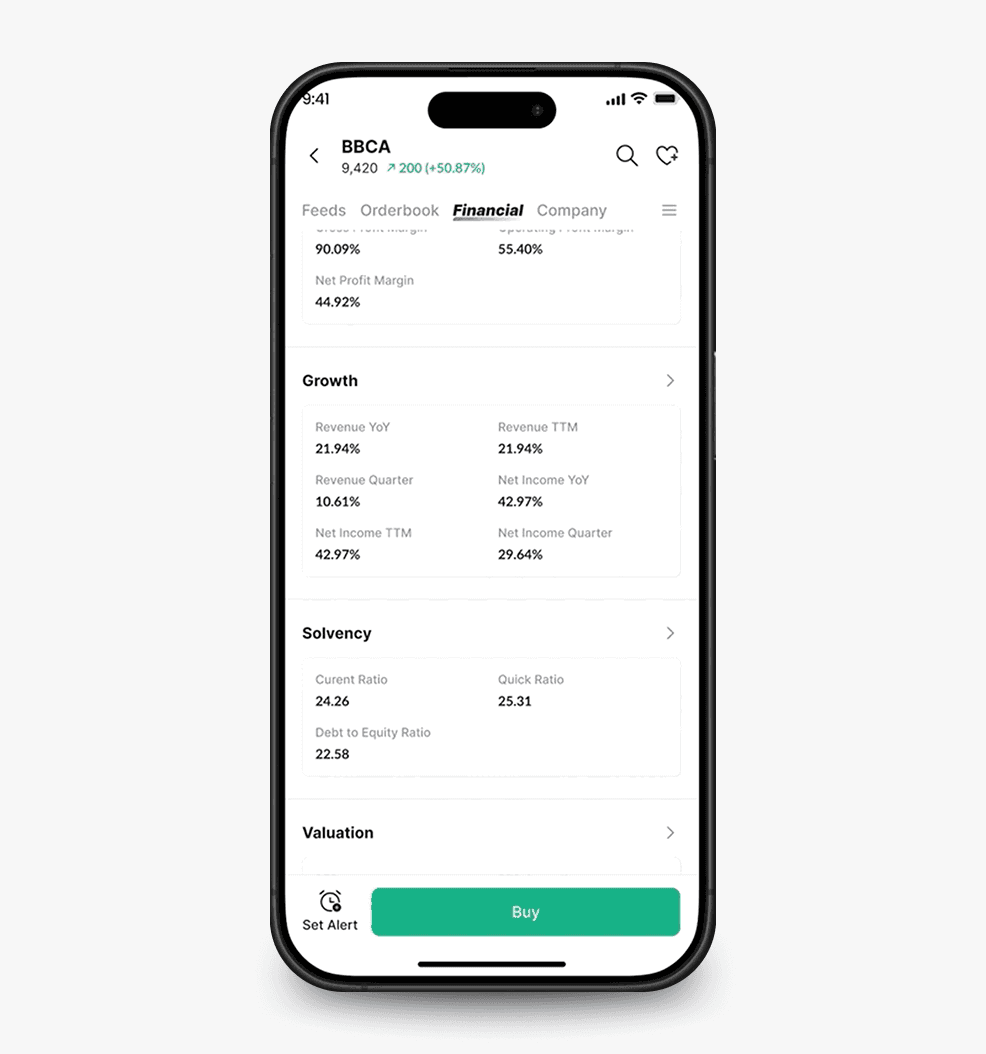
Users also need to view financial reports. They can simply open the Financial tab to see detailed financial statements and historical data.
Financial Tab
Users also need to view financial reports. They can simply open the Financial tab to see detailed financial statements and historical data.
Financial Tab
Users also need to view financial reports. They can simply open the Financial tab to see detailed financial statements and historical data.
Company Tab
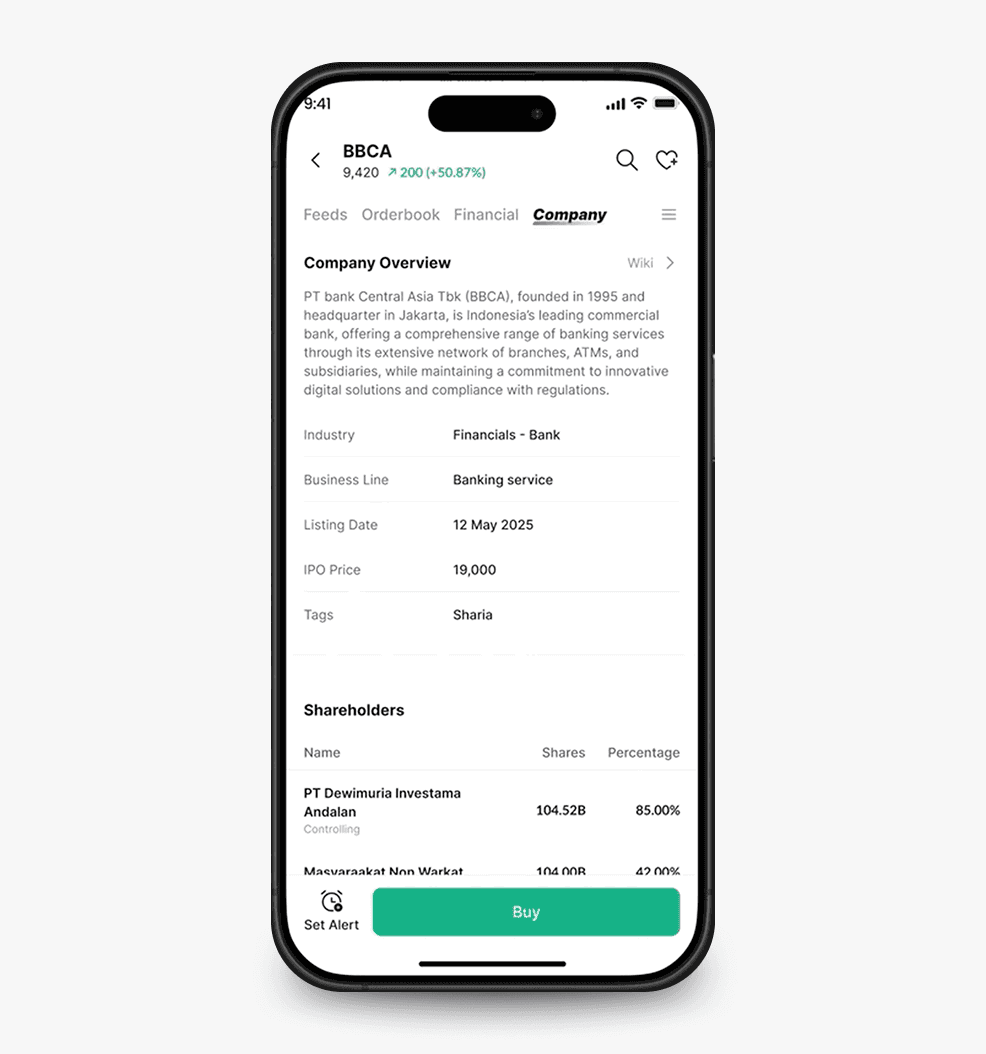
In this tab, users can easily view detailed company information, such as the company’s business sector, subsidiaries, ownership structure, and major shareholders. Users can also see details of upcoming and ongoing events, as well as dividend distribution information.
Company Tab
In this tab, users can easily view detailed company information, such as the company’s business sector, subsidiaries, ownership structure, and major shareholders. Users can also see details of upcoming and ongoing events, as well as dividend distribution information.
Company Tab
In this tab, users can easily view detailed company information, such as the company’s business sector, subsidiaries, ownership structure, and major shareholders. Users can also see details of upcoming and ongoing events, as well as dividend distribution information.
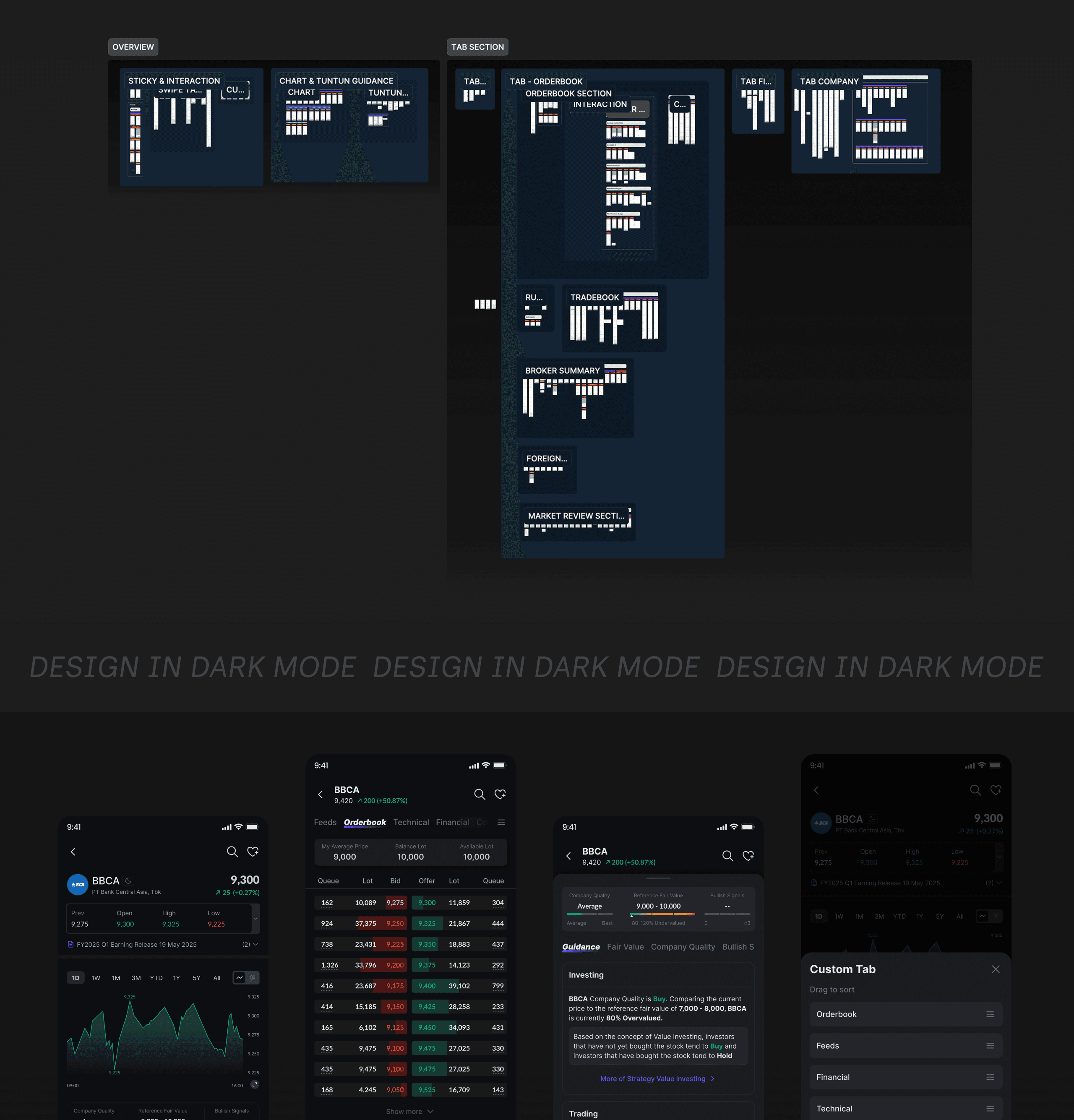
How I document my design for the handover process
The Result
65%
Increased Stock Page engagement by 65% within 7 days
65%
Increased Stock Page engagement by 65% within 7 days
65%
Increased Stock Page engagement by 65% within 7 days
58%
Drove +58% higher return visits to stock page within 7 days
58%
Drove +58% higher return visits to stock page within 7 days
58%
Drove +58% higher return visits to stock page within 7 days
14%
Improved Buy/Sell(Transaction) conversion by 14%
14%
Improved Buy/Sell(Transaction) conversion by 14%
14%
Improved Buy/Sell(Transaction) conversion by 14%