Create Tuntun Design System
Product
Finance Technology
Product
Finance Technology
Company
Tuntun Sekuritas
Company
Tuntun Sekuritas
Role
Sr. Product Designer
Role
Sr. Product Designer
Project Background
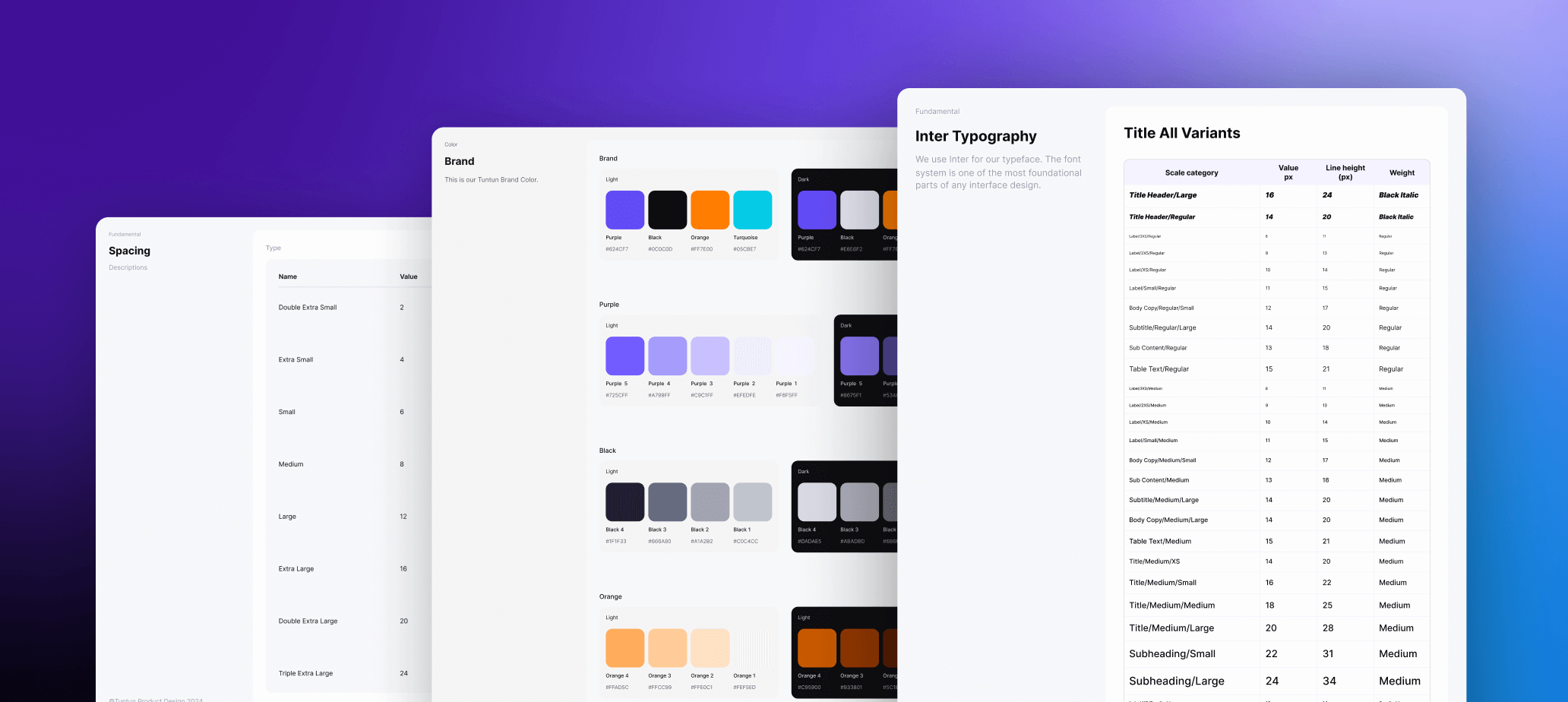
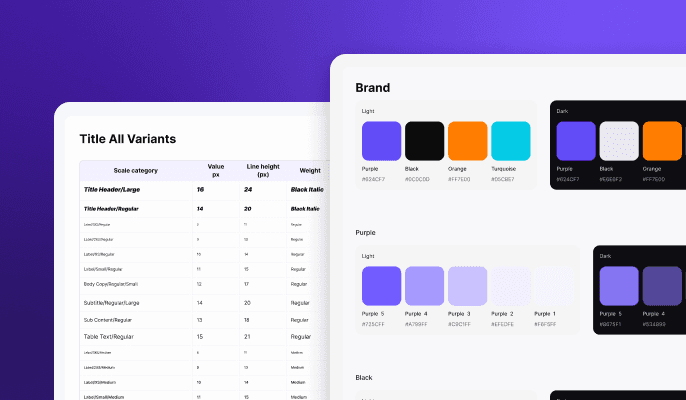
TDS is a Tuntun design system for products and digital experiences to build consistency across user experiences. TDS was created to solve the problem of inconsistent design elements, which were causing confusion for users and slowed down design also development progress. TDS consists of token libraries that have foundational elements, such as colors, typography, gradients, shadows, and spacing, radius, height These elements work together to build components, starting from atoms and building up to molecules, which are then used to create the screens, designs, and flows that we see in user interfaces. In our Design System we have Foundations, Components, Assets & Illustrations.
Project Background
TDS is a Tuntun design system for products and digital experiences to build consistency across user experiences. TDS was created to solve the problem of inconsistent design elements, which were causing confusion for users and slowed down design also development progress. TDS consists of token libraries that have foundational elements, such as colors, typography, gradients, shadows, and spacing, radius, height These elements work together to build components, starting from atoms and building up to molecules, which are then used to create the screens, designs, and flows that we see in user interfaces. In our Design System we have Foundations, Components, Assets & Illustrations.
Project Objective
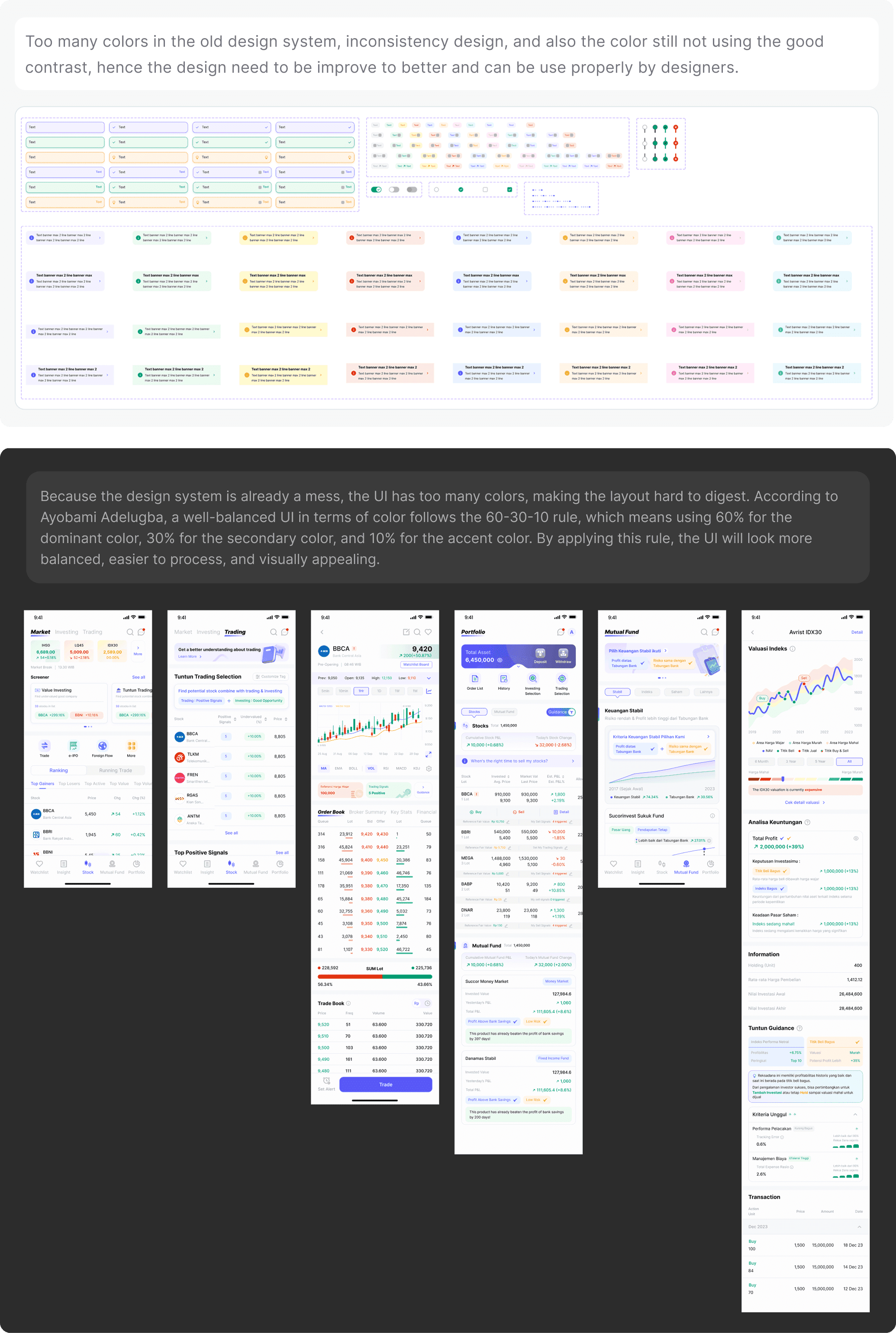
The objective we revamp the design sytem is because the old design system is too outdated for the design, not scalable, and also have incosistent colors which have so many colors that affect the overall UI looks, Therefore we will use the new TDS and change the all of the looks in the app to make the UI more consistent across every flow and make it more simple, and we ensure that in this new TDS engineer can easily use it to craft the component and designer can easily custom and use the properties that align with every use cases when the team want to design.
Project Objective
The objective we revamp the design sytem is because the old design system is too outdated for the design, not scalable, and also have incosistent colors which have so many colors that affect the overall UI looks, Therefore we will use the new TDS and change the all of the looks in the app to make the UI more consistent across every flow and make it more simple, and we ensure that in this new TDS engineer can easily use it to craft the component and designer can easily custom and use the properties that align with every use cases when the team want to design.
Identify Problem
When I joined Tuntun as the only designer on deck, I suddenly had huge responsibilities placed on my shoulders. I was responsible to revamp the design system for the team. Seeing the lack of parity between the designs and the actual code, it was high time for a concrete design system.
Identify Problem
When I joined Tuntun as the only designer on deck, I suddenly had huge responsibilities placed on my shoulders. I was responsible to revamp the design system for the team. Seeing the lack of parity between the designs and the actual code, it was high time for a concrete design system.
Identify Problem
When I joined Tuntun as the only designer on deck, I suddenly had huge responsibilities placed on my shoulders. I was responsible to revamp the design system for the team. Seeing the lack of parity between the designs and the actual code, it was high time for a concrete design system.
Foundation
Foundation is core elements of all visual and interactive design decisions. In TDS, we have several foundation elements such as color, typography, spacing, layout, sizing, shadow and corner radius. These foundation’s elements are integrated with engineering through design tokens.
Foundation
Foundation is core elements of all visual and interactive design decisions. In TDS, we have several foundation elements such as color, typography, spacing, layout, sizing, shadow and corner radius. These foundation’s elements are integrated with engineering through design tokens.
Foundation
Foundation is core elements of all visual and interactive design decisions. In TDS, we have several foundation elements such as color, typography, spacing, layout, sizing, shadow and corner radius. These foundation’s elements are integrated with engineering through design tokens.
1. Colors
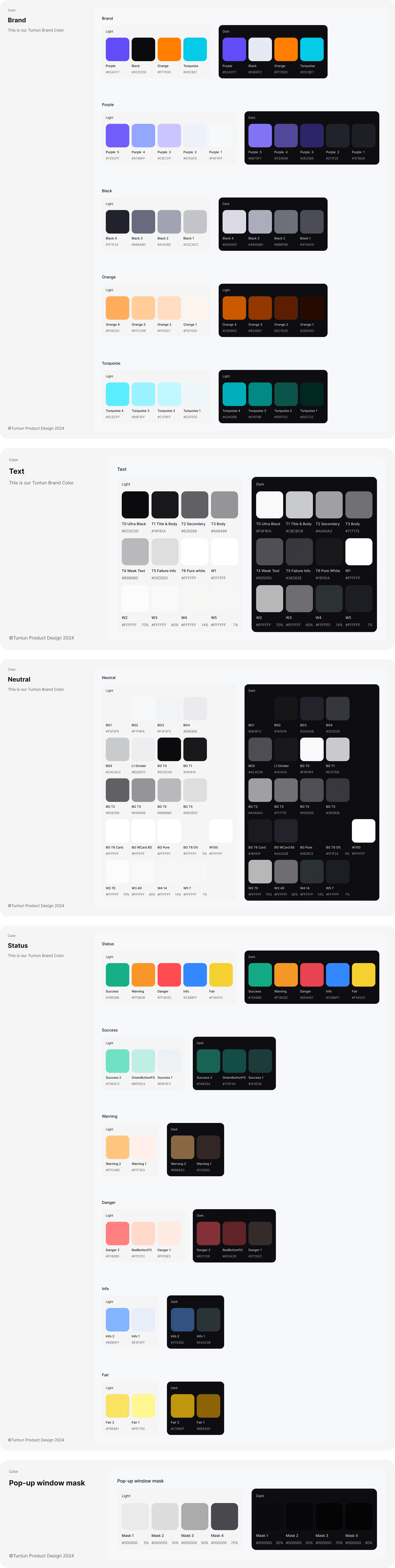
Color spectrum is a range of colors used to create a consistent and harmonious visual language for a brand or product. In TDS, we use color spectrum with a set of 5 tints and shades per color for both light and dark mode
1. Colors
Color spectrum is a range of colors used to create a consistent and harmonious visual language for a brand or product. In TDS, we use color spectrum with a set of 5 tints and shades per color for both light and dark mode
1. Colors
Color spectrum is a range of colors used to create a consistent and harmonious visual language for a brand or product. In TDS, we use color spectrum with a set of 5 tints and shades per color for both light and dark mode
2. Typography
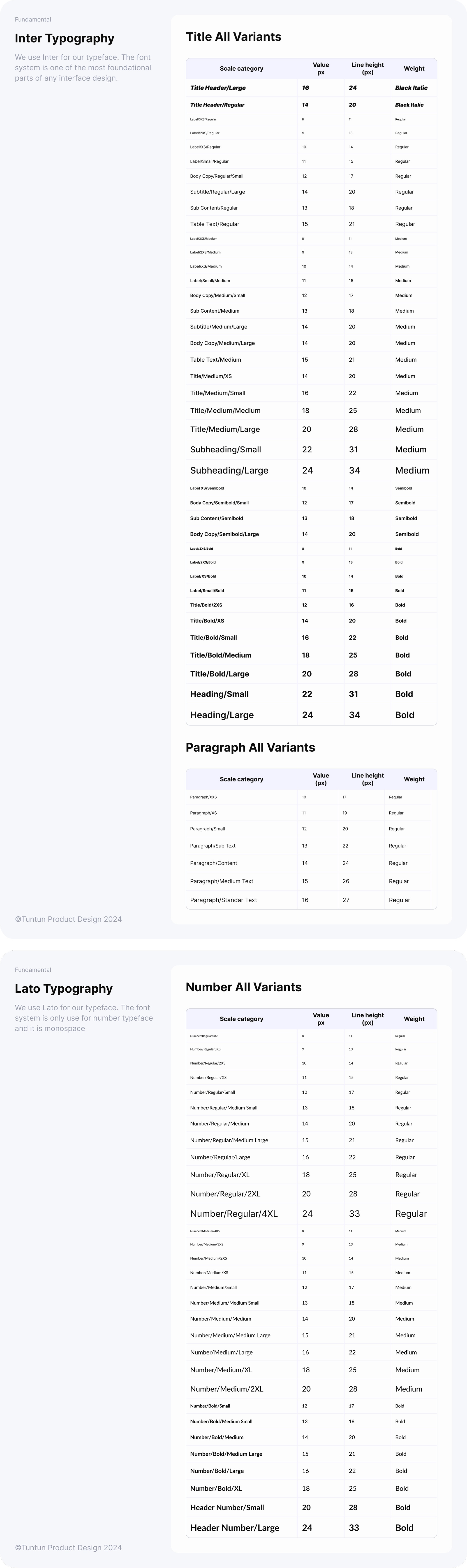
Typography organizes text placement and hierarchy levels when appearing on interfaces. By utilizing typography styles according to their characteristics, we can deliver well-structured content that comforts the readers’ eyes.
2. Typography
Typography organizes text placement and hierarchy levels when appearing on interfaces. By utilizing typography styles according to their characteristics, we can deliver well-structured content that comforts the readers’ eyes.
2. Typography
Typography organizes text placement and hierarchy levels when appearing on interfaces. By utilizing typography styles according to their characteristics, we can deliver well-structured content that comforts the readers’ eyes.
3. Spacing
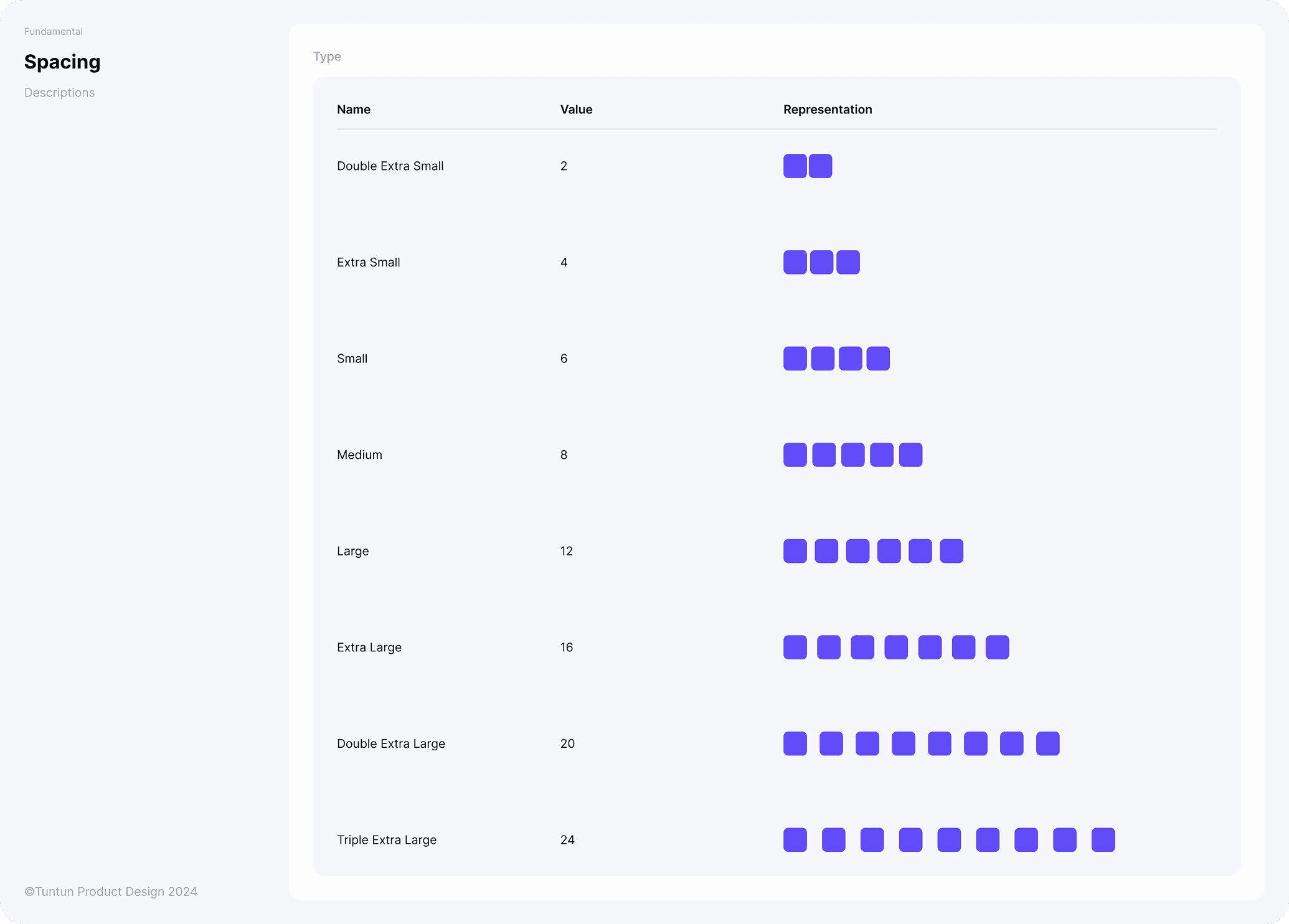
Spacing is the system of setting distances between elements. Spacing balances the objects within layouts, making them more visually structured and focused. In Syllabus, we have defined a set of spacing values that can be applied to various components and layouts, making it easier to maintain a consistent and cohesive design system.
3. Spacing
Spacing is the system of setting distances between elements. Spacing balances the objects within layouts, making them more visually structured and focused. In Syllabus, we have defined a set of spacing values that can be applied to various components and layouts, making it easier to maintain a consistent and cohesive design system.
3. Spacing
Spacing is the system of setting distances between elements. Spacing balances the objects within layouts, making them more visually structured and focused. In Syllabus, we have defined a set of spacing values that can be applied to various components and layouts, making it easier to maintain a consistent and cohesive design system.
4. Drop Shadow
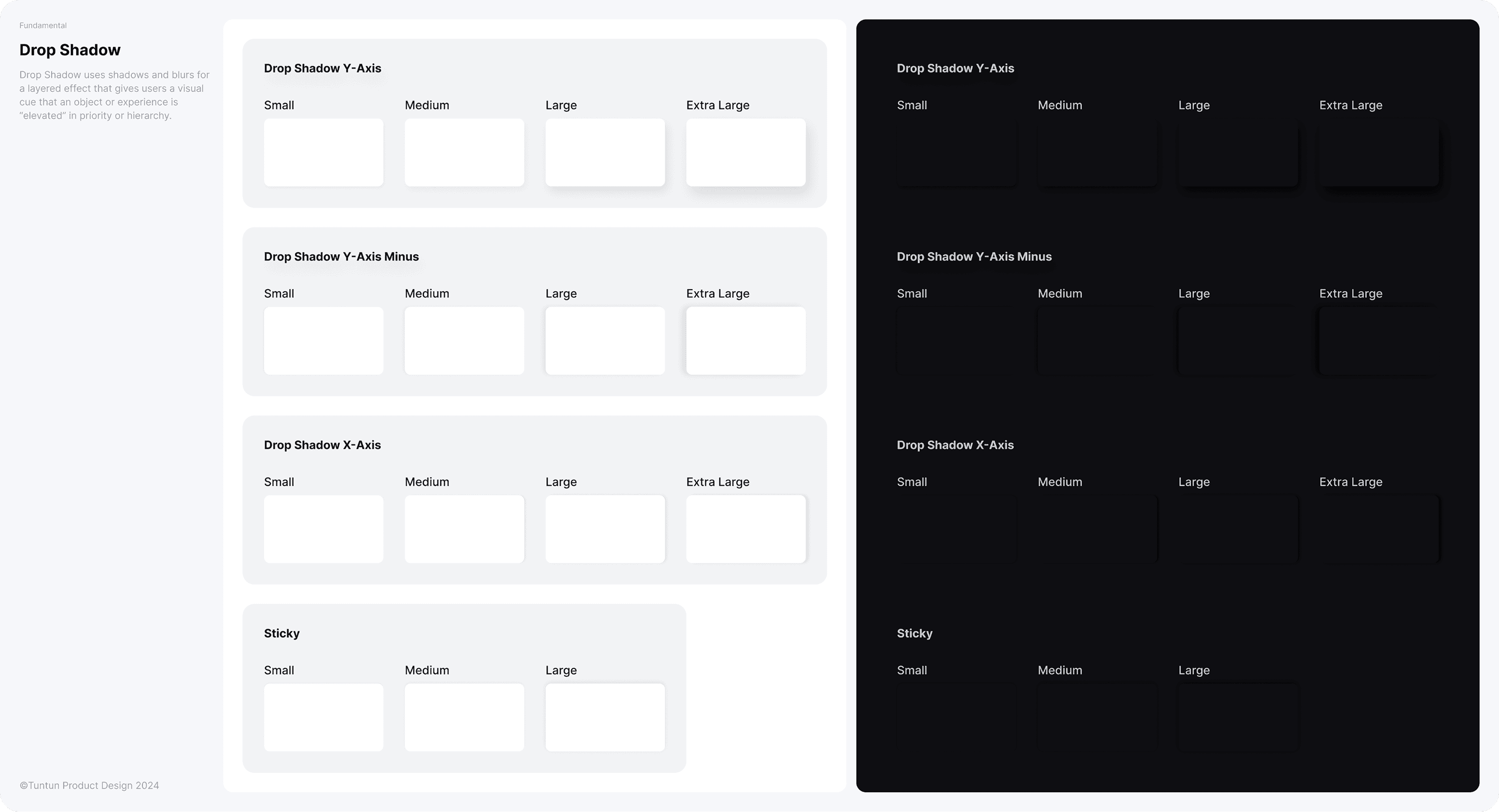
Drop Shadow uses shadows and blurs for a layered effect that gives users a visual cue that an object or experience is “elevated” in priority or hierarchy.
4. Drop Shadow
Drop Shadow uses shadows and blurs for a layered effect that gives users a visual cue that an object or experience is “elevated” in priority or hierarchy.
4. Drop Shadow
Drop Shadow uses shadows and blurs for a layered effect that gives users a visual cue that an object or experience is “elevated” in priority or hierarchy.
5. Corner Radius
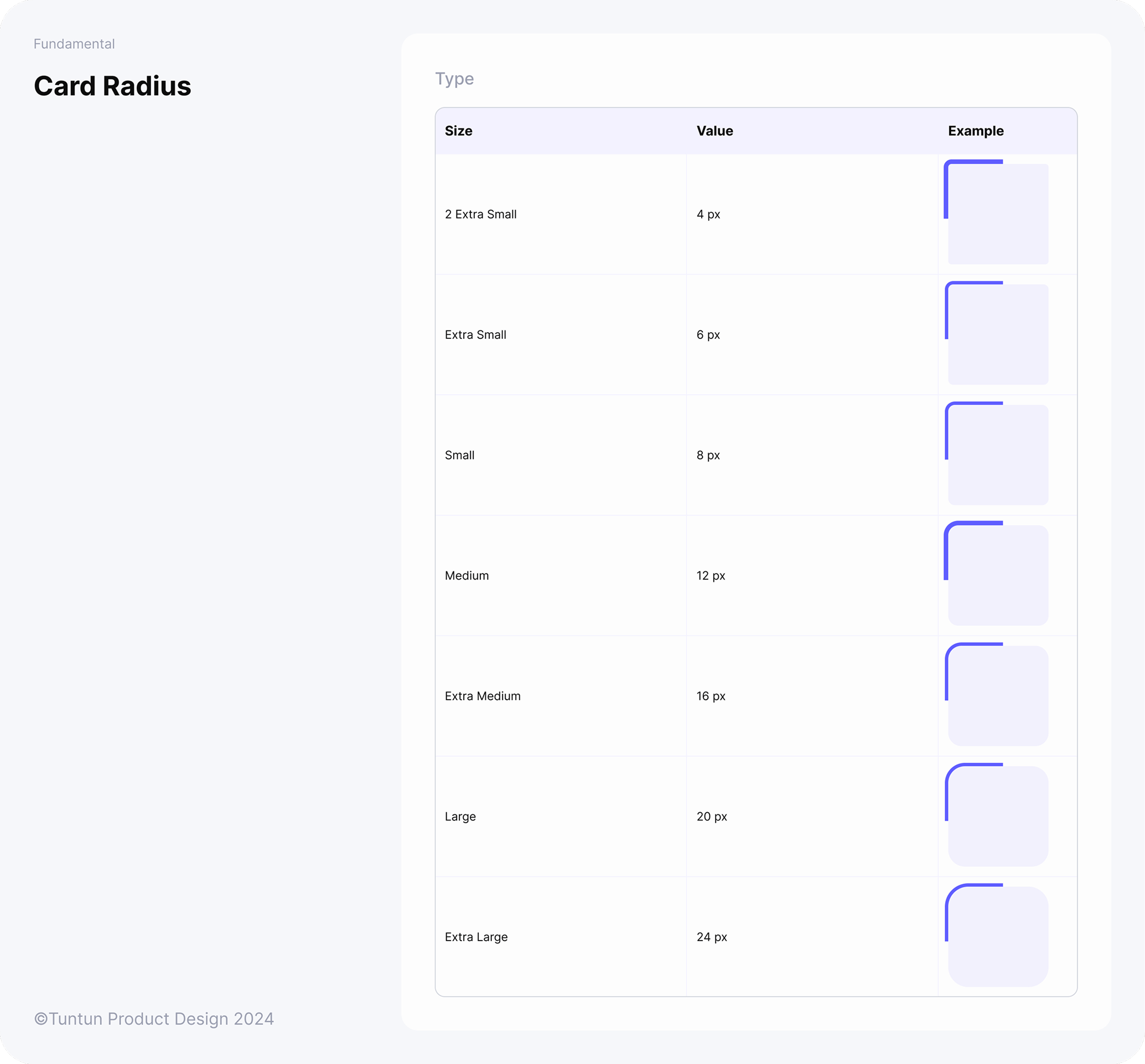
Drop Shadow uses shadows and blurs for a layered effect that gives users a visual cue that an object or experience is “elevated” in priority or hierarchy.
5. Corner Radius
Drop Shadow uses shadows and blurs for a layered effect that gives users a visual cue that an object or experience is “elevated” in priority or hierarchy.
5. Corner Radius
Drop Shadow uses shadows and blurs for a layered effect that gives users a visual cue that an object or experience is “elevated” in priority or hierarchy.
6. Components
Implementing Brad Frost's Atomic Design, TDS components act like building blocks that are specifically created to build familiar and consistent patterns in user interface. Each component is designed with accessibility in mind and can accommodate a variety of UI requirements, state changes, and variants. Since we have various products, this approach allows us to create a more efficient and scalable design system, making it easier to maintain consistency across different products and platforms.

6. Components
Implementing Brad Frost's Atomic Design, TDS components act like building blocks that are specifically created to build familiar and consistent patterns in user interface. Each component is designed with accessibility in mind and can accommodate a variety of UI requirements, state changes, and variants. Since we have various products, this approach allows us to create a more efficient and scalable design system, making it easier to maintain consistency across different products and platforms.
6. Components
Implementing Brad Frost's Atomic Design, TDS components act like building blocks that are specifically created to build familiar and consistent patterns in user interface. Each component is designed with accessibility in mind and can accommodate a variety of UI requirements, state changes, and variants. Since we have various products, this approach allows us to create a more efficient and scalable design system, making it easier to maintain consistency across different products and platforms.
🎉 After We Revamp TDS
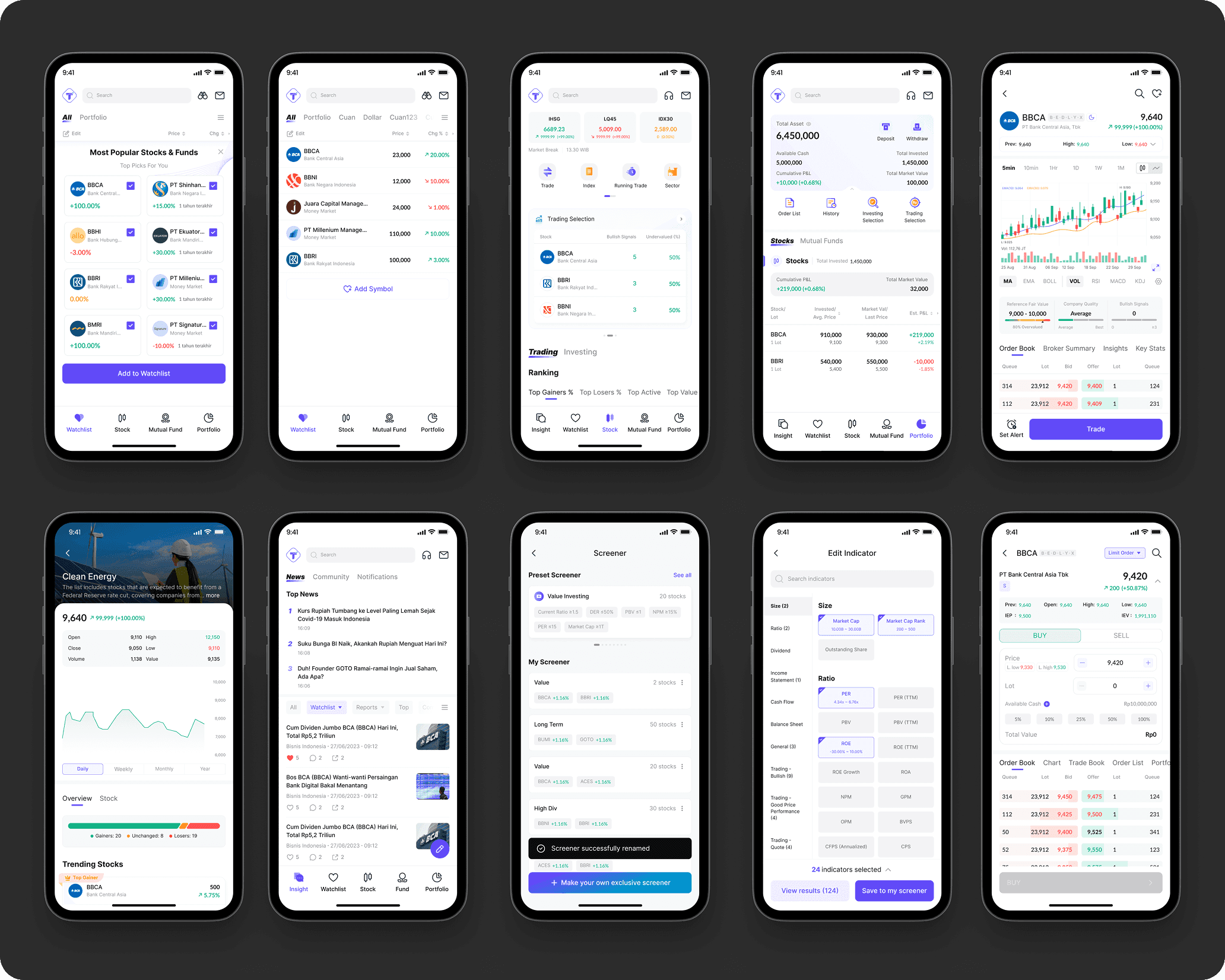
🎉 After We Revamp TDS
🎉 After We Revamp TDS
📈 The Results & Key Takeaways
Revamping the design system was a transformative process that streamlined UI consistency, improved collaboration, and enhanced the overall product experience. By restructuring components, refining color guidelines, and enforcing a systematic approach, the team achieved:
A Unified & Scalable Design System – Reduced inconsistencies by establishing a structured system that designers and developers could confidently rely on.
Simplified & Harmonized UI – Applied the 60-30-10 color rule to create a visually cohesive experience, making the interface easier to digest.
Stronger Cross-Team Collaboration – We worked closely with developers to ensure seamless implementation, reducing design handoff friction and improving build accuracy.
Improved Efficiency & Adoption – Provided clear documentation and Figma resources, enabling the team to work faster while maintaining design integrity
📈 The Results & Key Takeaways
Revamping the design system was a transformative process that streamlined UI consistency, improved collaboration, and enhanced the overall product experience. By restructuring components, refining color guidelines, and enforcing a systematic approach, the team achieved:
A Unified & Scalable Design System – Reduced inconsistencies by establishing a structured system that designers and developers could confidently rely on.
Simplified & Harmonized UI – Applied the 60-30-10 color rule to create a visually cohesive experience, making the interface easier to digest.
Stronger Cross-Team Collaboration – We worked closely with developers to ensure seamless implementation, reducing design handoff friction and improving build accuracy.
Improved Efficiency & Adoption – Provided clear documentation and Figma resources, enabling the team to work faster while maintaining design integrity
📈 The Results & Key Takeaways
Revamping the design system was a transformative process that streamlined UI consistency, improved collaboration, and enhanced the overall product experience. By restructuring components, refining color guidelines, and enforcing a systematic approach, the team achieved:
A Unified & Scalable Design System – Reduced inconsistencies by establishing a structured system that designers and developers could confidently rely on.
Simplified & Harmonized UI – Applied the 60-30-10 color rule to create a visually cohesive experience, making the interface easier to digest.
Stronger Cross-Team Collaboration – We worked closely with developers to ensure seamless implementation, reducing design handoff friction and improving build accuracy.
Improved Efficiency & Adoption – Provided clear documentation and Figma resources, enabling the team to work faster while maintaining design integrity